


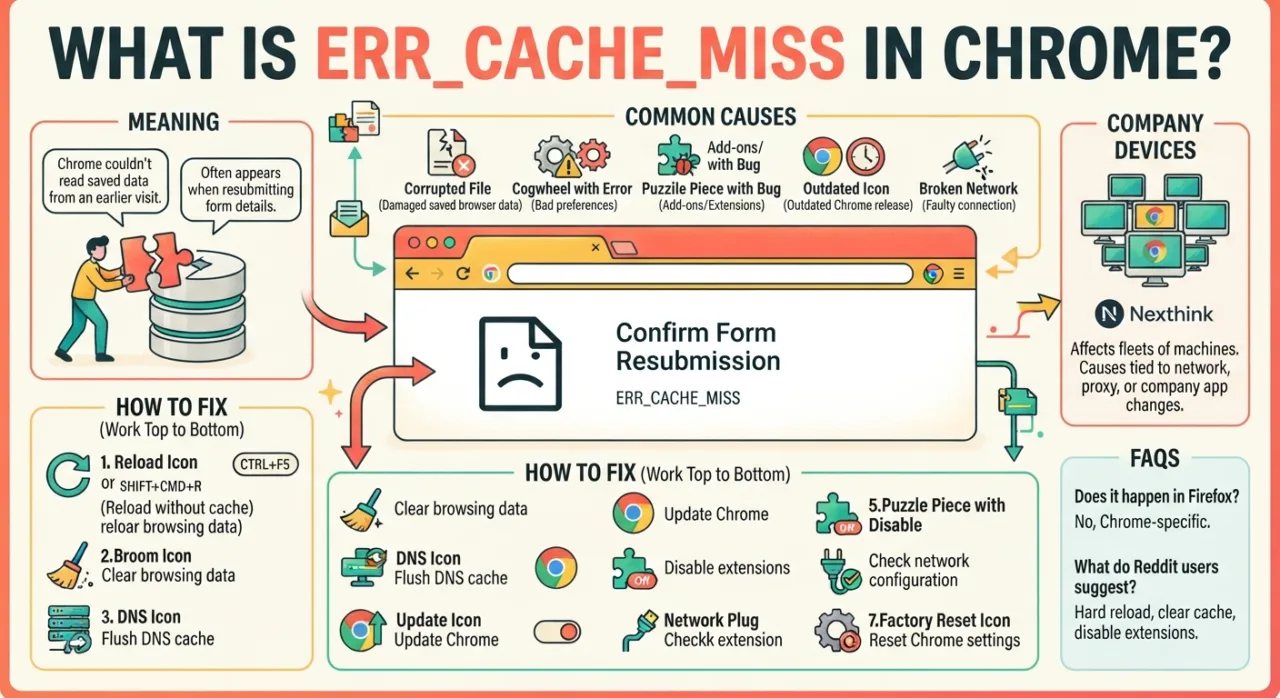
Chrome shows err_cache_miss next to a box headed Confirm Form Resubmission. The page wants your form details sent a second time. One sighting means little. Repeat sightings point at the browser itself: spoiled cached files, preference values Chrome cannot accept, or an extension getting in the way. The fixes below apply to a single laptop and to a fleet of company machines.
What Does ERR_CACHE_MISS Mean in Chrome?
The error belongs to Google Chrome alone. Firefox and Safari show different wording in the same situation. Chrome raises it when it cannot read data it saved from an earlier visit, so it stops and asks before resending anything.
Because the fault sits inside the browser, the operating system does not matter. Windows, macOS and ChromeOS machines can all display it. The Chrome release number matters more than the platform.
In most cases one device is affected. That device opens a page, public or internal, that changed since its last visit, and Chrome trips over the stale copy it kept.
What Causes ERR_CACHE_MISS?
Nexthink, which tracks the error across corporate endpoints, lists five roots behind it.
- Damaged saved browser data
- Preference values the browser cannot accept
- Add-ons running inside Chrome
- An outdated Chrome release
- Faults on the connection out to the web
The first three live on the device. The last two can hit dozens of machines at once, which changes how you approach the repair.
How to Fix ERR_CACHE_MISS in Chrome
Work top to bottom. Each step gets more disruptive than the last, and most people never reach the end of the list.
1. Reload the page without the cache
Press CTRL+F5 on Windows or Shift+Cmd+R on a Mac. Chrome pulls a fresh copy from the server instead of reading the stored one. The fault is usually short-lived, so this alone clears it more often than not.
2. Clear browsing data
Old cached files go bad. Open the three-dot menu, choose Delete browsing data, and pick the Basic tab so passwords and personal settings survive. The step-by-step guide to clearing Chrome cache and cookies covers desktop, Android and iPhone.
3. Flush the DNS cache
Useful when the site you are opening has moved to a new server. Type chrome://net-internals/#dns into the address bar and click Clear host cache. Nothing else in the browser is touched. A separate walkthrough on Chrome’s net-internals DNS page explains when the flush helps and when it does not.
4. Update Chrome
Chrome ships releases often. Go to Help, then About Google Chrome, and relaunch if a version is waiting. On a Chromebook the browser updates with the system, so check About ChromeOS instead. Here is how to update a Chromebook’s version if the check-for-updates button is not where you expect.
5. Remove junk toolbars and suspect extensions
Poor toolbars carrying malware often show up just before the fault does. Open chrome://extensions, switch everything off, and reload the failing page. Turn extensions back on one at a time until the error returns. This guide on deleting Chrome extensions also covers add-ons that refuse to uninstall.
6. Check the network configuration
Wrong DNS values on the client stop Chrome reaching the right server. On a DHCP network, run ipconfig /renew from a command prompt. Where addresses are set by hand, type the correct DNS server values into the adapter’s IP settings.
7. Reset Chrome to factory preferences
A reset clears clashing preferences. Open Settings, then Reset settings, then Restore settings to their original defaults. On ChromeOS the same option sits inside the browser; resetting Chrome settings on a Chromebook walks through it. Note what you lose: a full reset wipes every saved preference, bookmark, password and autofill entry, so export anything you need first.
ERR_CACHE_MISS Across Many Company Devices
When several people report the error together, measure the spread before changing anything. Nexthink recommends four questions:
| Question worth asking |
|---|
| Has Chrome taken a new release lately? |
| Has the network shifted, so traffic now takes another path to the site? |
| Do the machines rely on a fixed proxy to reach their target? |
| Has the target itself, normally a site, been altered or swapped? |
Where the errors gather tells you the cause. Faults tied to one application mean that web app changed. Faults tied to one Chrome release mean the browser changed. Faults tied to one office or hierarchy node usually mean a network edit or a proxy machine sits behind it. Faults at certain hours point to a scheduled job, such as a nightly backup eating network capacity.
Nexthink’s Remote Actions can clear browser data, flush DNS and reset preferences on affected machines without a desk visit. For a wide outbreak, pair those actions with an on-screen note so staff know work is under way. The Google Chrome library pack lists installed add-ons and checks whether the release is current or pinned, which narrows down whether one Chrome extension version is to blame.
FAQs
What does ERR_CACHE_MISS mean?
ERR_CACHE_MISS means Chrome could not read a file it had saved from an earlier visit. It usually appears with a Confirm Form Resubmission prompt and stems from corrupted cached data, bad preferences, extensions, an old Chrome release or a network fault.
How do I fix ERR_CACHE_MISS in Chrome
Press CTRL+F5 first. If the error stays, clear browsing data, flush the DNS cache at chrome://net-internals/#dns, update Chrome, disable extensions, then reset Chrome to its default settings as a last step.
Why does Chrome keep asking to confirm form resubmission?
Chrome blocks resending form data on its own. When you reload or go back on a page that posted a form, it pauses and asks. A repeat pattern points to damaged cached files or a page that changed since your last visit.
What do Reddit users recommend for ERR_CACHE_MISS?
Reddit threads in r/chrome and r/techsupport mostly settle on the same order: hard reload, clear cache, disable extensions. Several Reddit posters also report the error vanishing after updating Chrome or opening the page in an incognito window.
Does ERR_CACHE_MISS happen in Firefox or Edge?
No. The ERR_CACHE_MISS label is specific to Chrome. Firefox shows a Document Expired message in the same situation, and Edge, though built on Chromium, words its prompt differently. The underlying cause, stale form or cache data, is the same.
