

Close Menu
    Facebook X (Twitter) Instagram
    • About
    • Privacy Policy
    • Write For Us
    • Newsletter
    • Contact
    Instagram
    About ChromebooksAbout Chromebooks
    • Linux
    • News
      • Stats
      • Reviews
    • AI
    • How to
      • DevOps
      • IP Address
    • Apps
    • Business
    • Q&A
      • Opinion
    • Gaming
      • Google Games
    • Blog
    • Podcast
    • Contact
    About ChromebooksAbout Chromebooks
    News

    Files app on Chromebooks getting prepped for Google Drive updates

    Kevin TofelBy Kevin TofelApril 17, 2018Updated:May 10, 2025No Comments2 Mins Read

    Admittedly, the Files app on Chrome OS is pretty bare-bones. It’s simple but lacks many features found on Windows and MacOS computers. It’s getting better though, at least based on some new code commits that show what the Chrome OS team is working on in regards to Google Drive integration.

    First is a quick method spotted by XDA-Developers to manage a file stored on your Google Drive. Ideally, I’d like to see the Files app natively support all of the same management features you see in the Drive web app. That’s not what the team is working on…. yet.

    For now, it looks like a “Manage in Drive” option will appear when right-clicking a file in the Files app. That will open up the Drive web app and take you to the file so you can fully manage it, i.e.: Share, Get Sharable Link, Move, Make a Copy, etc… Note that you’ll need to be online for this option. That makes sense since Files will be sending you to the live Google Drive web app. Presumably, if your Chromebook doesn’t have connectivity, the “Manage in Drive” option will be hidden or greyed out.

    Related to this change — bundled with it, in fact — is another Drive redirect option that has to do with file sharing. Apparently, the Share feature as part of “Manage in Drive” hasn’t been working for files (but not yet folders) stored in Team Drives. That’s getting fixed per the code commits, assuming all of the testing works out.
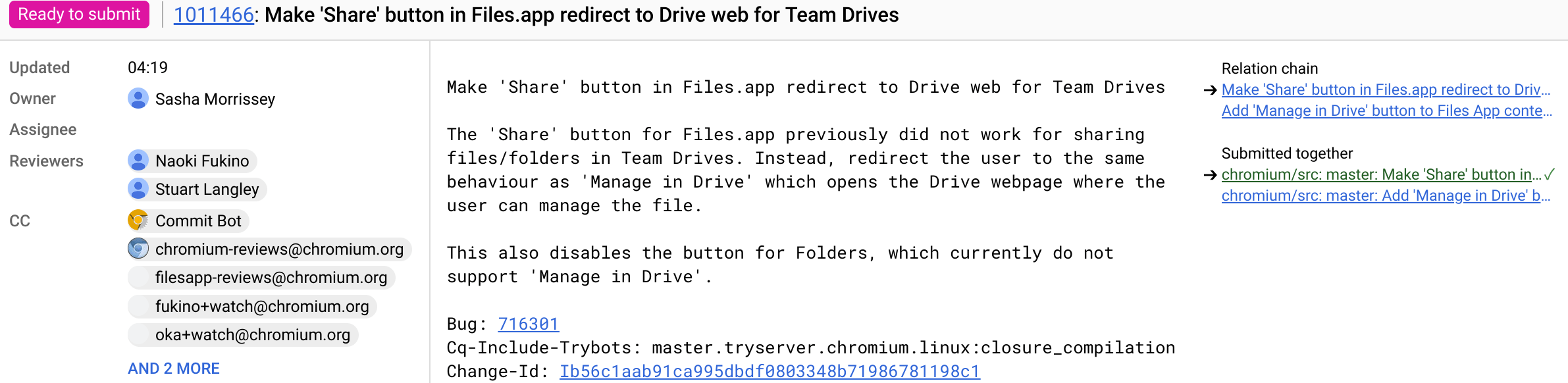
    Chromium Gerrit files app

    Note that these updates to the Files app aren’t even in the Dev Channel yet, so it’s possible that there are additional changes or modifications to the current work-in-progress features. Hopefully we see them soon, along with even more functionality for the Files app in Chrome OS.

    Kevin Tofel
    • Website

    After spending 15 years in IT at Fortune 100 companies, Kevin turned a hobby into a career and began covering mobile technology in 2003. He writes daily on the industry and has co-hosted the weekly MobileTechRoundup podcast since 2006. His writing has appeared in print (The New York Times, PC Magazine and PC World) and he has been featured on NBC News in Philadelphia.

    Best of AI

    Chub AI Explained

    May 6, 2026

    Stable Diffusion AI: Free Text To Image AI Generator

    May 5, 2026

    Imagen AI: The Best Photo Editing AI In 2026

    April 21, 2026

    Alphafold AI from Google Deepmind 2026

    April 21, 2026

    Agentic AI Pindrop Anonybit: The Future of Secure Identity Verification

    April 17, 2026
    Trending Stats

    Education Sector Chromebook Adoption Statistics 2026

    May 4, 2026

    ChromeOS Data Usage Patterns And Statistics 2026

    May 2, 2026

    Auto Update Expiration (AUE) In Chromebooks Statistics 2026

    May 2, 2026

    Chromebook Vs IPad Adoption In Schools Statistics 2026

    May 1, 2026

    ChromeOS Accessibility Feature Usage Statistics 2026

    April 28, 2026
    • About
    • Tech Guest Post
    • Contact
    • Privacy Policy
    • Sitemap
    © 2026 About Chrome Books. All rights reserved.

    Type above and press Enter to search. Press Esc to cancel.