

Close Menu
    Facebook X (Twitter) Instagram
    • About
    • Privacy Policy
    • Write For Us
    • Newsletter
    • Contact
    Instagram
    About ChromebooksAbout Chromebooks
    • Linux
    • News
      • Stats
      • Reviews
    • AI
    • How to
      • DevOps
      • IP Address
    • Apps
    • Business
    • Q&A
      • Opinion
    • Gaming
      • Google Games
    • Blog
    • Podcast
    • Contact
    About ChromebooksAbout Chromebooks
    How to

    How to view the differences between two Chrome OS versions

    Kevin TofelBy Kevin TofelSeptember 15, 2018No Comments2 Mins Read

    Although the Chrome Releases blog is a great resource to learn when Chrome OS versions are updated, it’s a bit lacking when it comes to detailed release notes. That makes it nearly impossible to quickly see exactly what has changed. But there’s actually an easy method to see what’s different.

    When an update is announced, you’ll want to make note of the new version number. And you’ll also want the current version from your Chromebook before you upgrade.

    For example, this past Wednesday, the Chrome Releases site announced a new Dev version: 70.0.3538.16. Prior to getting the update, my Pixelbook was running version 70.0.3538.8. So I wanted to see the differences between the two.

    It’s as simple as hitting this link, which shows only the different (or new) files in the more current version: https://chromium.googlesource.com/chromium/src/+log/70.0.3532.8..70.0.3538.16?pretty=fuller&n=10000:
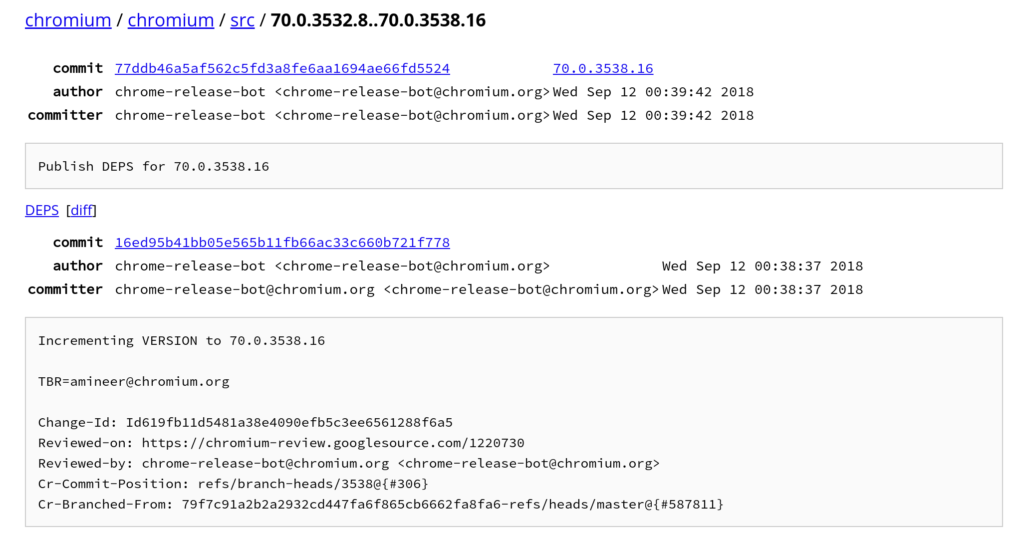
    Note that both the old and new version numbers are part of the URL. By changing those numbers, you can view the differences between any two Chrome OS releases on the same channel.

    Once you have the differences, you can scroll through to view specifics. If you’d rather see a summary list with clickable links on each change for the details, simply remove the “?pretty=fuller&n=10000” from the URL:
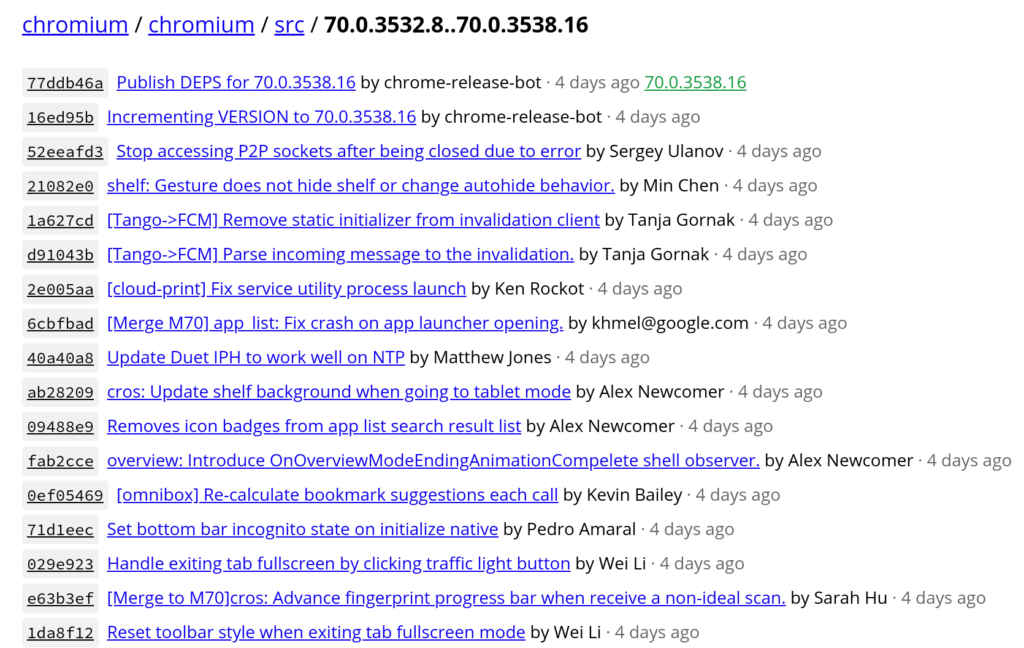
    Sometimes the version announcements include the diff link for you, but more often than not, they don’t. So bookmark the link between two versions and change them for any release so you can see what’s new.

    Kevin Tofel
    • Website

    After spending 15 years in IT at Fortune 100 companies, Kevin turned a hobby into a career and began covering mobile technology in 2003. He writes daily on the industry and has co-hosted the weekly MobileTechRoundup podcast since 2006. His writing has appeared in print (The New York Times, PC Magazine and PC World) and he has been featured on NBC News in Philadelphia.

    Best of AI

    Imagen AI: The Best Photo Editing AI In 2026

    April 21, 2026

    Alphafold AI from Google Deepmind 2026

    April 21, 2026

    Agentic AI Pindrop Anonybit: The Future of Secure Identity Verification

    April 17, 2026

    Google Bard Statistics And User Data 2026

    April 10, 2026

    Azure OpenAI Explained

    April 10, 2026
    Trending Stats

    ChromeOS Accessibility Feature Usage Statistics 2026

    April 28, 2026

    Chromebook Resale Value Depreciation Statistics 2026

    April 27, 2026

    ChromeOS App Ecosystem Growth Statistics 2026

    April 25, 2026

    Chromebook vs Tablet Usage In Education Statistics 2026

    April 23, 2026

    ChromeOS Update Frequency Statistics 2026

    April 22, 2026
    • About
    • Tech Guest Post
    • Contact
    • Privacy Policy
    • Sitemap
    © 2026 About Chrome Books. All rights reserved.

    Type above and press Enter to search. Press Esc to cancel.