

Close Menu
    Facebook X (Twitter) Instagram
    • About
    • Privacy Policy
    • Write For Us
    • Newsletter
    • Contact
    Instagram
    About ChromebooksAbout Chromebooks
    • Linux
    • News
      • Stats
      • Reviews
    • AI
    • How to
      • DevOps
      • IP Address
    • Apps
    • Business
    • Q&A
      • Opinion
    • Gaming
      • Google Games
    • Blog
    • Podcast
    • Contact
    About ChromebooksAbout Chromebooks
    News

    Linux package installs on Chromebooks to show app name, version and details, possibly in Chrome OS 73

    Kevin TofelBy Kevin TofelFebruary 18, 2019Updated:September 10, 2025No Comments2 Mins Read

    Back in September, I pointed out a Chrome OS bug report that had planned to provide more detailed information on a Linux application before actually installing it on a Chromebook. Work has continued on that effort and I recently captured a screenshot to show how it will look in Chrome OS:
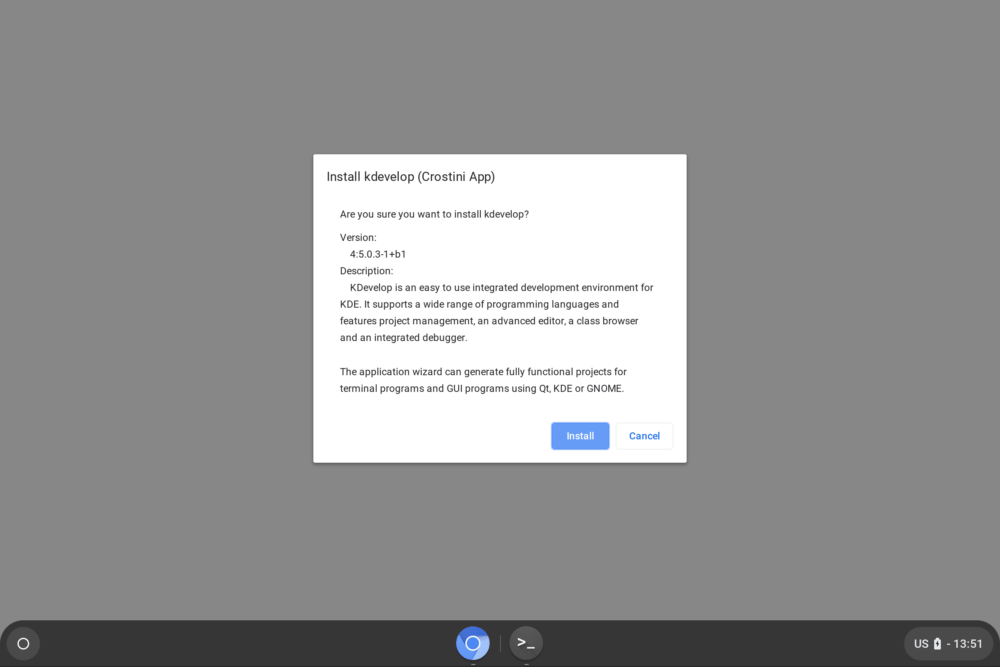
    This screenshot isn’t from my Pixel Slate; the feature hasn’t been released yet so I don’t have access to it. Instead, this is a work-in-progress capture from the Chromium team as the functionality continues to develop.

    As a result, the final implementation could look different. But I’m pretty doubtful that much if anything will change from this image. The original feature description was to add “a details pane in the file manager’s .deb install dialog to provide package name, version, and a description of the package,” which is exactly what this dialog box provides.

    The idea here is that when using the native Files app to install a Debian package — essentially a Linux app — users will know more about what it is they’re actually installing before they click that Install button, making the experience a little more user-friendly and informative.

    I’ll be watching for this feature in the next release of the Chrome OS 73 Dev Channel since there’s a feature freeze date on February 22 for this version. If the dialog box doesn’t make the cut, look for this addition in Chrome OS 74.

    Kevin Tofel
    • Website

    After spending 15 years in IT at Fortune 100 companies, Kevin turned a hobby into a career and began covering mobile technology in 2003. He writes daily on the industry and has co-hosted the weekly MobileTechRoundup podcast since 2006. His writing has appeared in print (The New York Times, PC Magazine and PC World) and he has been featured on NBC News in Philadelphia.

    Best of AI

    AI in Healthcare Adoption Statistics 2026

    July 9, 2026

    Deepfake Incident Statistics 2026

    July 7, 2026

    Best AI Music and Vocal Tools for Chromebook Users in 2026 

    June 24, 2026

    What Does Adobe Firefly AI Do?

    June 16, 2026

    Is Joyland AI Safe For Kids?

    June 12, 2026
    Trending Stats

    Chromebook Peripheral Usage Statistics 2026: Device Connectivity And Usage Data

    June 30, 2026

    ChromeOS Update Size and Installation Statistics 2026: System Performance Reports

    June 27, 2026

    Chromebook vs MacBook and Windows Boot Time Statistics 2026: Performance Benchmark Data

    June 25, 2026

    Chromebook Brand Reliability Scores Statistics 2026: Quality Ratings And User Reports

    June 24, 2026

    Chromebook Performance Degradation Statistics 2026: Long-Term Usage And Reliability Data

    June 23, 2026
    • About
    • Tech Guest Post
    • Contact
    • Privacy Policy
    • Sitemap
    © 2026 About Chrome Books. All rights reserved.

    Type above and press Enter to search. Press Esc to cancel.