

Close Menu
    Facebook X (Twitter) Instagram
    • About
    • Privacy Policy
    • Write For Us
    • Newsletter
    • Contact
    Instagram
    About ChromebooksAbout Chromebooks
    • Linux
    • News
      • Stats
      • Reviews
    • AI
    • How to
      • DevOps
      • IP Address
    • Apps
    • Business
    • Q&A
      • Opinion
    • Gaming
      • Google Games
    • Blog
    • Podcast
    • Read More
      • Review
      • Insights
    About ChromebooksAbout Chromebooks
    News

    Latest Chrome OS Canary build brings Google Assistant redesign and Android Pie 9.0 to Chromebooks

    Kevin TofelBy Kevin TofelOctober 22, 2018Updated:September 12, 2025No Comments2 Mins Read

    If you’re waiting for Android 8 to arrive on your Chromebook, you can stop waiting. No, you didn’t get it and in fact, you probably aren’t. That’s OK though: Google appears to be skipping Android 8.0 for Chrome OS and going directly to Android 9.0, aka, Android Pie. The news comes by way of Chrome Story, which shows the Android 9.0 upgrade in the latest Chrome OS Canary Channel, which I presume to be Chrome OS 72.

    This actually shouldn’t be totally unexpected: The Chrome OS system tray and started mimicking those in Android 9, not Android 8, back in May. And frankly, Android 8 was introduced roughly a year ago. Why not bring the Android functionality up to a more current level at this point for Chromebooks?

    Aside from supporting Android apps with the higher API level that adds new functionality to them, this also adds some interesting features. First is a change from using the Chrome OS camera app to the Android Camera software by default. That move should bring much higher image quality to Chromebooks and Chrome tablets — I’m looking at you Pixel Slate — when using the cameras for images, videos and video conferencing.
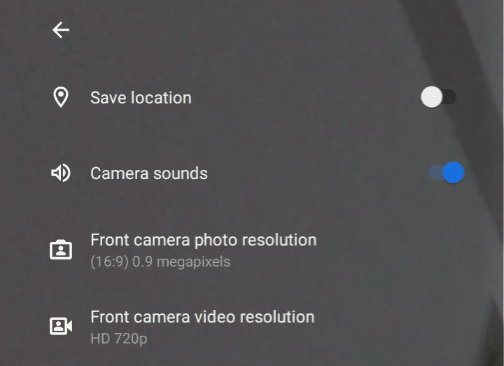
    Image Credit: Chrome Story

    Also updated in Chrome OS Canary is the Google Assistant interface. Instead of being put off the side, the Assistant moves front and center, getting a more modern look. Google has been making a big push lately with its Home and Pixel product lines; bringing more prominence to the Assistant on Chrome OS is right in line to continue that strategy. I actually don’t use the Assistant that much on my Pixelbook — I generally forget it’s there — so I’ll be curious if the change causes me to engage more with it.
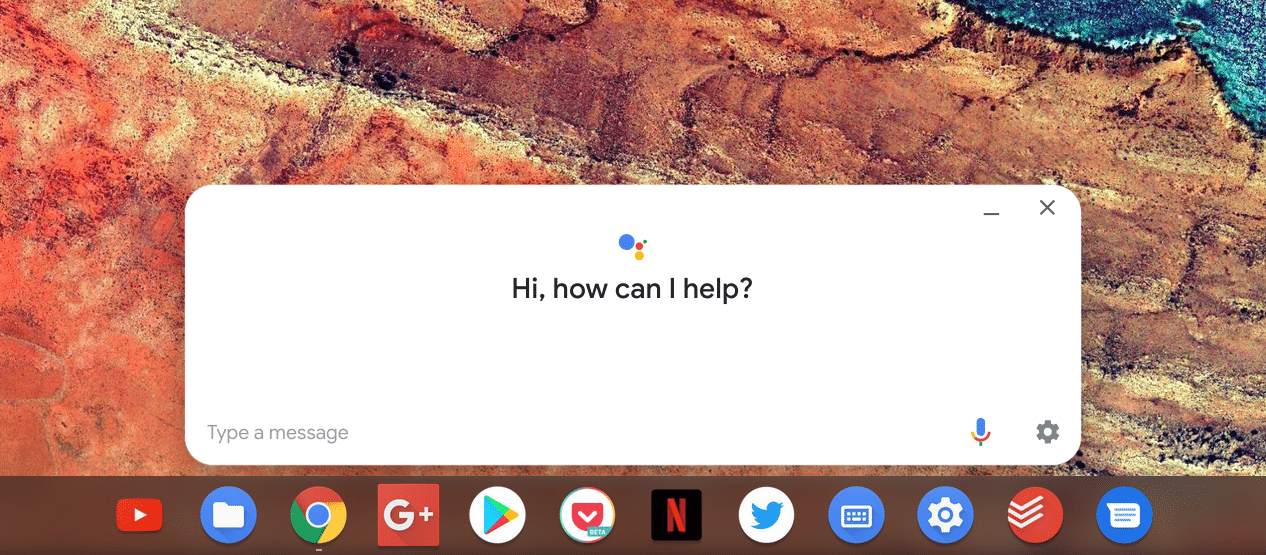
    Image Credit: Chrome Story

    Hopefully, some additional features are added through the Android 9 upgrade. One in particular that I know folks are looking for is improved usage of micro SD and SD cards with Android apps. It could be that this is really on developers to add the functionality since some apps do work well with removable storage on Chromebooks, but if there are any tweaks that Google needs to make for this, I hope they’re in the next major Chrome OS version update.

    Kevin Tofel
    • Website

    After spending 15 years in IT at Fortune 100 companies, Kevin turned a hobby into a career and began covering mobile technology in 2003. He writes daily on the industry and has co-hosted the weekly MobileTechRoundup podcast since 2006. His writing has appeared in print (The New York Times, PC Magazine and PC World) and he has been featured on NBC News in Philadelphia.

    Best of AI

    AI Safety Incident Reporting Statistics 2026

    October 16, 2026

    AI Browser Statistics 2026 [Arc, Dia, Comet]

    October 15, 2026

    ElevenLabs Statistics 2026

    October 9, 2026

    Enterprise LLM Vendor Market Share Statistics 2026

    October 1, 2026

    Qwen AI statistics 2026

    September 30, 2026
    Trending Stats

    Chromebook Carbon Footprint Statistics 2026

    October 3, 2026

    Linux Kernel Contributor Statistics 2026

    September 26, 2026

    Chromebook Enterprise Deployment Statistics 2026 [Setup Times, Fleet Volumes, Licensing and Migration Data]

    September 22, 2026

    Vector Database Market Statistics 2026

    September 15, 2026

    Chromebook Screen Refresh Rate Distribution Statistics 2026

    September 12, 2026
    • About
    • Tech Guest Post
    • Contact
    • Privacy Policy
    • Sitemap
    © 2026 About Chrome Books. All rights reserved.

    Type above and press Enter to search. Press Esc to cancel.