

Close Menu
    Facebook X (Twitter) Instagram
    • About
    • Privacy Policy
    • Write For Us
    • Newsletter
    • Contact
    Instagram
    About ChromebooksAbout Chromebooks
    • Linux
    • News
      • Stats
      • Reviews
    • AI
    • How to
      • DevOps
      • IP Address
    • Apps
    • Business
    • Q&A
      • Opinion
    • Gaming
      • Google Games
    • Blog
    • Podcast
    • Contact
    About ChromebooksAbout Chromebooks
    News

    Chrome OS 76 improves desktop notifications by moving the “Clear all” button to the top

    Kevin TofelBy Kevin TofelMay 16, 2019Updated:May 16, 2019No Comments2 Mins Read

    I can’t be the only one that generally loathes clearing notifications from a Chromebook. For as long as we could view notifications on the desktop, they stack up and up and up and yet, you had to scroll down, down, down the stack to find that elusive “Clear All” button.

    Chrome OS 76 appears to address that with a simple change: The option to clear notifications appears at the top of the stack.
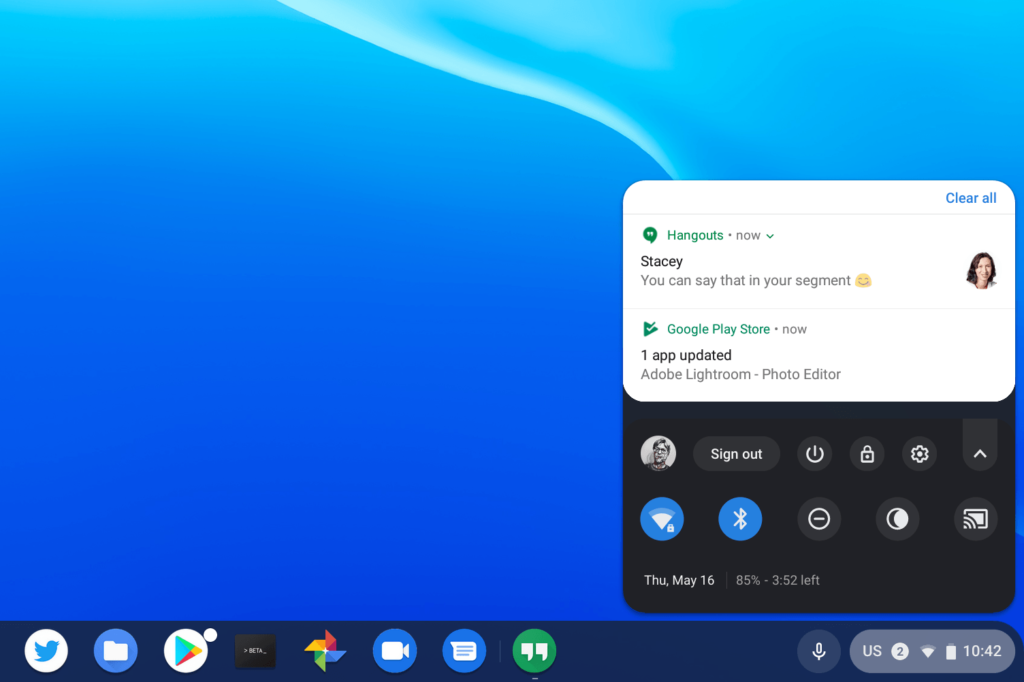
    I didn’t see any code changes for this user interface change, nor did I have to enable any flags or settings. I just happened to notice it a short time ago after the latest Chrome OS update. After doing a five minute happy dance, I then wrote this up to share the news.

    Note that I’m running Chrome OS 76 on the Canary Channel, which gets updates every few days, if not more often at times. It’s considered experimental. Still, it provides a good look at upcoming changes that will filter their way through the Dev, Beta and Stable Channels of Chrome OS.

    Frankly, I’m not sure why the “Clear all” option was ever at the bottom of the stack. Chromebook users on their device for more than a few hours a day don’t have to wait long before notifications can stack up before having to scroll and scroll to clear them.

    Maybe the original design was meant to mimic Android, where the option to clear all notifications appears at the bottom of the stacked information. But Android devices are generally a top-down experience with notifications: They float down from the top of the display of a phone or tablet. With Chromebooks, they float up from the bottom of the display so it’s more intuitive – at least to me – that the option to clear them should be at the top.

    Kevin Tofel
    • Website

    After spending 15 years in IT at Fortune 100 companies, Kevin turned a hobby into a career and began covering mobile technology in 2003. He writes daily on the industry and has co-hosted the weekly MobileTechRoundup podcast since 2006. His writing has appeared in print (The New York Times, PC Magazine and PC World) and he has been featured on NBC News in Philadelphia.

    Best of AI

    LMArena AI: Chatbot Ranking Platform 2026

    May 27, 2026

    Will AI Take Over the World

    May 25, 2026

    AI21 Jurassic Statistics 2026: Model Size, Usage and AI Performance Trends

    May 19, 2026

    Chub AI Explained

    May 6, 2026

    Stable Diffusion AI: Free Text To Image AI Generator

    May 5, 2026
    Trending Stats

    Chromebook Browser Usage Statistics 2026: User Behavior Data And Reports

    June 3, 2026

    ChromeOS vs Windows Power Consumption Statistics 2026: Battery Life, Wattage, and Energy Cost Data

    June 2, 2026

    Chromebook Price vs Performance Statistics 2026: Value And Hardware Trends

    May 27, 2026

    Chromebook Failure Rates vs Windows Laptops Statistics 2026: Reliability, Repairs And Performance Comparison

    May 26, 2026

    ChromeOS Update Failure Rates Statistics 2026: Stability, Security And System Reliability Trends

    May 25, 2026
    • About
    • Tech Guest Post
    • Contact
    • Privacy Policy
    • Sitemap
    © 2026 About Chrome Books. All rights reserved.

    Type above and press Enter to search. Press Esc to cancel.