

Close Menu
    Facebook X (Twitter) Instagram
    • About
    • Privacy Policy
    • Write For Us
    • Newsletter
    • Contact
    Instagram
    About ChromebooksAbout Chromebooks
    • News
      • Stats
    • AI
    • How to
      • DevOps
      • IP Address
    • Apps
    • Business
    • Q&A
      • Opinion
    • Gaming
      • Google Games
    • Blog
    • Podcast
    • Contact
    About ChromebooksAbout Chromebooks
    News

    VPN TUN support coming soon to Linux on Chromebooks with Crostini

    Kevin TofelBy Kevin TofelFebruary 5, 2019Updated:February 5, 2019No Comments2 Mins Read
    Share
    Facebook Twitter LinkedIn Pinterest

    One of the benefits to running Linux desktop apps on a Chromebook via Project Crostini is having access to more apps that work in a business environment. But one of the fairly standard requirements in many businesses is using a VPN, or Virtual Private Network, for security reasons. Chrome OS network traffic can be securely routed through an Android VPN client but that security doesn’t extend to Linux apps in a Crostini container.

    That’s about to change due to a code commit made today to address this feature request that’s been in the Chrome OS bug repository since November, although the issue was first reported last April.

    The code is fairly simple, adding these few lines to Tremplin, which according to its readme file is “the “springboard” daemon that runs in the Termina VM and exposes a gRPC interface for managing LXD containers.”
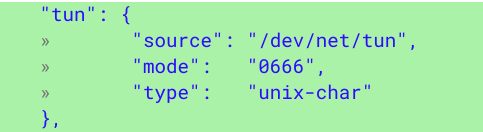
    Essentially, this code change natively implements what has been a workaround to get VPN functionality within Crostini as noted here, which has been to run these commands in crosh (ctrl + alt + t):

    • vmc start termina
    • lxc config device add penguin tun unix-char path=/dev/net/tun

    Tun, by the way, is a virtual network layer device on Level 3 of the OSI model for networking, although you may not care about that. What you might care about is that after the code change was made, OpenVPN was successfully run by the Chromium developer, suggesting that this should bring VPN access to the Linux container.

    Given the small scope of this change and the positive test results, I’d expect this function to appear in the Canary channel within the next few days; I’m running the Dev Channel, so I won’t be able to test it until it arrives there, however. Just to be clear: This code change enables VPN support but doesn’t actually add a VPN. For that, you’ll need to find a VPN provider such as OpenVPN, NordVPN, TorGuard VPN or one of several other options available on the market.

    Chrome OS Chrome OS 73 Crostini Enterprise Linux Linux Apps networking Productivity Project Crostini Security VPN
    Share. Facebook Twitter Pinterest LinkedIn Tumblr
    Kevin Tofel
    • Website

    After spending 15 years in IT at Fortune 100 companies, Kevin turned a hobby into a career and began covering mobile technology in 2003. He writes daily on the industry and has co-hosted the weekly MobileTechRoundup podcast since 2006. His writing has appeared in print (The New York Times, PC Magazine and PC World) and he has been featured on NBC News in Philadelphia.

    Related Posts

    Auto DraftStarbucks Partner Hours: Manual to Managing Work Schedules

    January 26, 2026

    Anon Vault For Private Cloud Storage

    January 23, 2026

    GitHub Copilot Statistics [2026]

    January 7, 2026

    Comments are closed.

    Best of AI

    Make-A-Video Statistics 2026

    January 30, 2026

    Stable Video Diffusion User Trends And Statistics 2026

    January 29, 2026

    VALL-E Statistics 2026

    January 28, 2026

    StarCoder Statistics And User Trends 2026

    January 27, 2026

    BLIP-2 Statistics 2026

    January 23, 2026
    Trending Stats

    Google Penalty Recovery Statistics 2026

    January 30, 2026

    Search engine operators Statistics 2026

    January 29, 2026

    Most searched keywords on Google

    January 27, 2026

    Ahrefs Search Engine Statistics 2026

    January 19, 2026

    Pay Per Click Advertising Statistics 2026

    January 16, 2026
    • About
    • Write For Us
    • Contact
    • Privacy Policy
    • Sitemap
    © 2026 About Chrome Books. All rights reserved.

    Type above and press Enter to search. Press Esc to cancel.