Close Menu
    Facebook X (Twitter) Instagram
    • About
    • Privacy Policy
    • Write For Us
    • Newsletter
    • Contact
    Instagram
    About ChromebooksAbout Chromebooks
    • Linux
    • News
      • Stats
      • Reviews
    • AI
    • How to
      • DevOps
      • IP Address
    • Apps
    • Business
    • Q&A
      • Opinion
    • Gaming
      • Google Games
    • Blog
    • Podcast
    • Contact
    About ChromebooksAbout Chromebooks
    News

    Here’s what Linux backup and restore for Chromebooks looks like, expected in Chrome OS 74

    Kevin TofelBy Kevin TofelFebruary 15, 2019Updated:September 22, 2025No Comments2 Mins Read

    A few weeks ago I pointed out a new feature targeted for Chrome OS 74: A native way to backup and restore Linux apps and data on Chromebooks that support Project Crostini. Since then, the Chromium team has made a big push to nail down the functionality in advance of the Chrome OS 74 feature freeze date, which is February 22: Aside from the code to support backups and restores, there was a slew of interface work done this week.

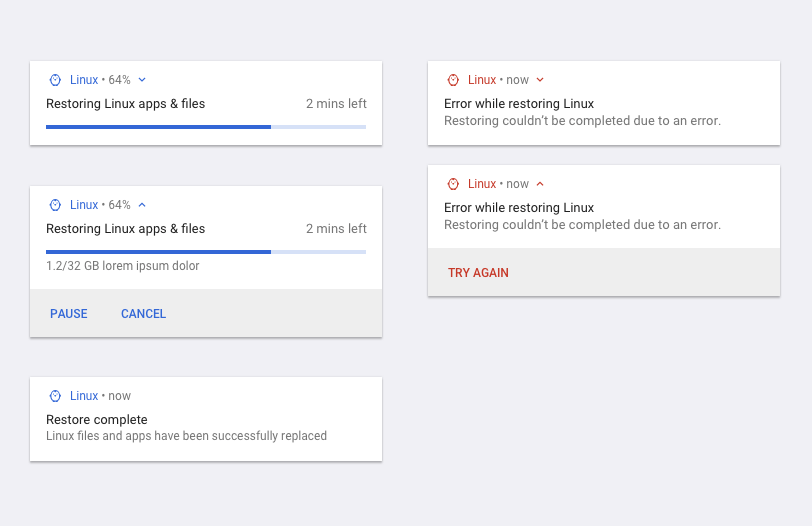
    Here’s what it looks like in mockups, which of course, could always change before the final implementation.
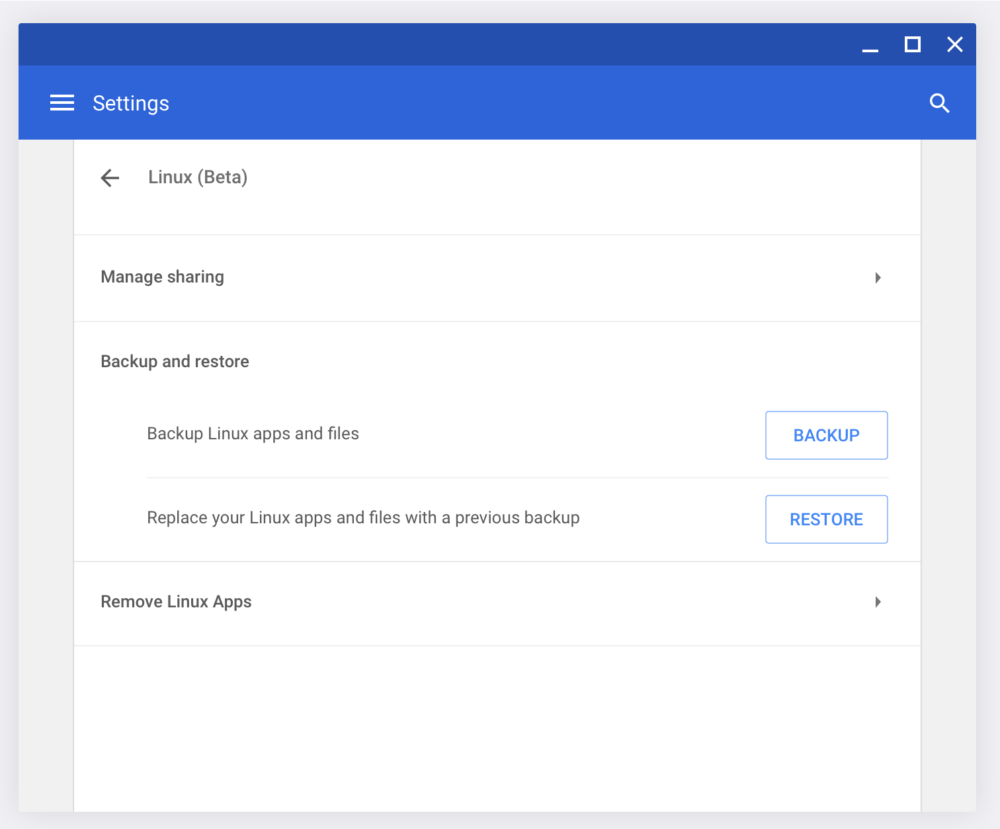
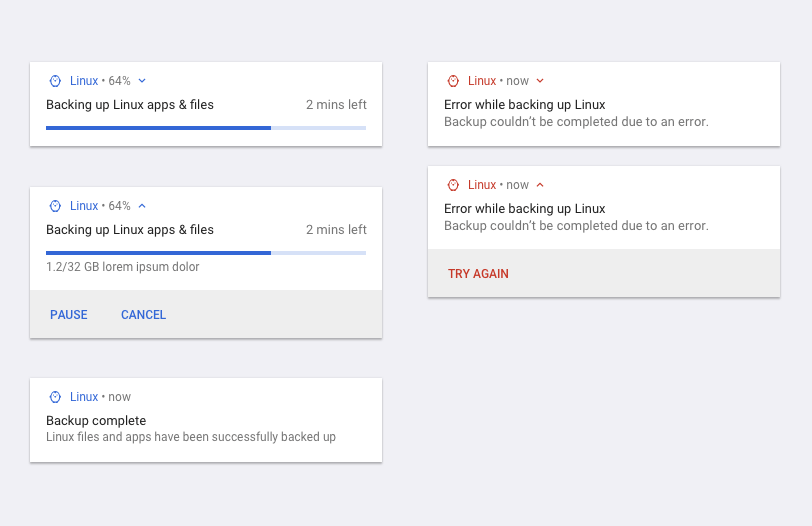
    Linux backup and restore in Chrome OS
    Linux backup messaging in Chrome OS
    Linux restore in Chrome OS

    Note that you can currently back up and restore a Linux container in Crostini today, but it’s a manual process using LXD commands, which you can find in this excellent guide. The process captures the entire container, meaning your Linux apps, settings, and data.

    Although Linux support on Chrome OS was originally aimed for the developer audience, there are certainly everyday, mainstream users of the feature. And why not? Even if there’s a single Linux desktop app that can extend your Chromebook experience, that’s a win all around. Making it a more user-friendly experience is a smart strategy on Google’s part.

    Once the backup and restore function rolls out, it’s expected to be managed through chrome://flags/#crostini-backup, but I anticipate that the feature will be enabled by default if you have the Linux (beta) feature on. My understanding of the native feature is that you’ll be able to save your backup to external storage, which you can now do thanks to memory card and USB drive support added to Chrome OS 72.

    Kevin Tofel
    • Website

    After spending 15 years in IT at Fortune 100 companies, Kevin turned a hobby into a career and began covering mobile technology in 2003. He writes daily on the industry and has co-hosted the weekly MobileTechRoundup podcast since 2006. His writing has appeared in print (The New York Times, PC Magazine and PC World) and he has been featured on NBC News in Philadelphia.

    Best of AI

    What Does Adobe Firefly AI Do?

    June 16, 2026

    Is Joyland AI Safe For Kids?

    June 12, 2026

    LMArena AI: Chatbot Ranking Platform 2026

    May 27, 2026

    Will AI Take Over the World

    May 25, 2026

    AI21 Jurassic Statistics 2026: Model Size, Usage and AI Performance Trends

    May 19, 2026
    Trending Stats

    Chromebook Repairability Scores Statistics 2026: Hardware Serviceability Reports

    June 22, 2026

    ChromeOS Feature Adoption Rates Statistics 2026: User Adoption Metrics And Data

    June 20, 2026

    Chromebook Storage Usage Statistics 2026: Device Storage Consumption Trends

    June 18, 2026

    Conversational AI Market Statistics 2026: Chatbot Usage And Enterprise Deployment

    June 17, 2026

    Chromebook Gaming Usage Statistics 2026: Player Engagement And Usage Reports

    June 17, 2026
    • About
    • Tech Guest Post
    • Contact
    • Privacy Policy
    • Sitemap
    © 2026 About Chrome Books. All rights reserved.

    Type above and press Enter to search. Press Esc to cancel.