

Close Menu
    Facebook X (Twitter) Instagram
    • About
    • Privacy Policy
    • Write For Us
    • Newsletter
    • Contact
    Instagram
    About ChromebooksAbout Chromebooks
    • Linux
    • News
      • Stats
      • Reviews
    • AI
    • How to
      • DevOps
      • IP Address
    • Apps
    • Business
    • Q&A
      • Opinion
    • Gaming
      • Google Games
    • Blog
    • Podcast
    • Contact
    About ChromebooksAbout Chromebooks
    News

    Chrome OS 75 Stable version arrives: Here’s what you need to know

    Kevin TofelBy Kevin TofelJune 26, 2019Updated:May 11, 2026No Comments2 Mins Read

    Chrome OS 75 was expected to hit the Stable Channel about a week or two ago, but it didn’t. Until today, that is. On Wednesday, Google began to release the Chrome OS 75 Stable Channel update, which will hit devices on a rolling schedule over the coming days.

    In terms of release notes, here’s what Google says you can find in this new version, some of which I’ve previously covered and tested:

    • Feature to let parents grant more time to their kids on Chrome OS devices
    • Enabling kid friendly Assistant for child accounts
    • Linux (Beta) can now access Android devices over USB
    • Files app support for 3rd party file provider apps implementing Android DocumentsProvider APIs
    • Add support for PIN code with native printers for managed devices

    Of course, there’s more in Chrome OS 75 than the above five bullet points.

    For example, this is the version of Chrome OS that markedly improves the tablet mode animations on the Google Pixel Slate. I captured some of my testing on video so you can see how much better this experience is. There is still room for improvement, but this is a big step forward.

    You’ll also get Chrome’s version of “reader mode”: When browsing a site, this removes everything but text and images so you can focus on the content. To use it, you might first need to flip the switch at chrome://flags/#enable-reader-mode. Then, click the three-dot menu button at the top right of your browser and choose the “Distill page” option for a distraction-free reading experience, such as this:
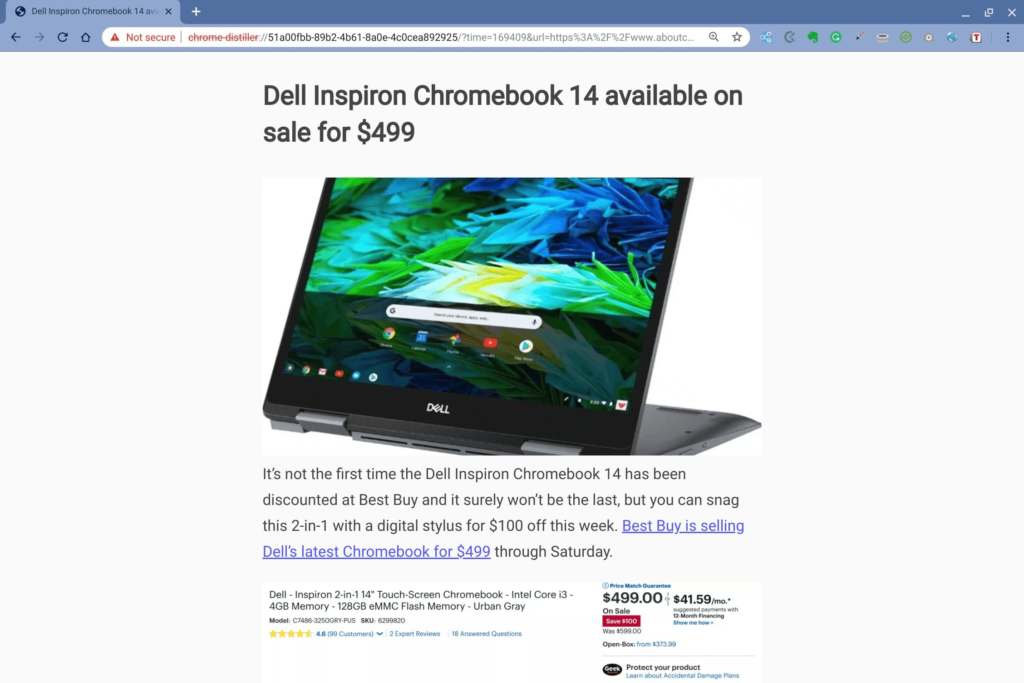
    Google also disabled a feature, at least by default. If you want to use the Crostini / Linux container backup or restore feature, you’ll have to manually enable it in Chrome OS 75. This was originally slated to happen in the next update, but apparently made the cut for version 75.

    I’ll continue to dig around the release notes and update this post if I can verify previously reported features or any other new changes and features additions.

    Kevin Tofel
    • Website

    After spending 15 years in IT at Fortune 100 companies, Kevin turned a hobby into a career and began covering mobile technology in 2003. He writes daily on the industry and has co-hosted the weekly MobileTechRoundup podcast since 2006. His writing has appeared in print (The New York Times, PC Magazine and PC World) and he has been featured on NBC News in Philadelphia.

    Best of AI

    What Does Adobe Firefly AI Do?

    June 16, 2026

    Is Joyland AI Safe For Kids?

    June 12, 2026

    LMArena AI: Chatbot Ranking Platform 2026

    May 27, 2026

    Will AI Take Over the World

    May 25, 2026

    AI21 Jurassic Statistics 2026: Model Size, Usage and AI Performance Trends

    May 19, 2026
    Trending Stats

    Conversational AI Market Statistics 2026: Chatbot Usage And Enterprise Deployment

    June 17, 2026

    Chromebook Gaming Usage Statistics 2026: Player Engagement And Usage Reports

    June 17, 2026

    Chromebook Battery Degradation Statistics 2026: Lifecycle Performance Testing Data

    June 15, 2026

    Chromebook Touchscreen vs Non-Touchscreen Usage Statistics 2026: Device Interaction and Form Factor Data

    June 11, 2026

    Chromebook Performance Across Price Segments Statistics 2026: Benchmark Comparison Data

    June 10, 2026
    • About
    • Tech Guest Post
    • Contact
    • Privacy Policy
    • Sitemap
    © 2026 About Chrome Books. All rights reserved.

    Type above and press Enter to search. Press Esc to cancel.