

Close Menu
    Facebook X (Twitter) Instagram
    • About
    • Privacy Policy
    • Write For Us
    • Newsletter
    • Contact
    Instagram
    About ChromebooksAbout Chromebooks
    • Linux
    • News
      • Stats
      • Reviews
    • AI
    • How to
      • DevOps
      • IP Address
    • Apps
    • Business
    • Q&A
      • Opinion
    • Gaming
      • Google Games
    • Blog
    • Podcast
    • Contact
    About ChromebooksAbout Chromebooks
    News

    Chrome OS 80 likely to fix notification actions on external monitors

    Kevin TofelBy Kevin TofelNovember 21, 2019Updated:September 20, 2025No Comments2 Mins Read

    Lately, I’ve been using an external monitor with the Pixelbook Go for testing purposes and didn’t realize that Chrome OS notifications don’t quite work correctly.

    According to an open bug report, when a notification pops up it does appear on both the internal and external displays but isn’t always actionable on the external monitor:

    when there’s a screenshot or a file downloaded, the notifications mirror on both the internal and external display.
    – But for screenshot, you can’t press COPY on the external monitor. You can on the internal monitor for the same notifications.
    – For file download, you can’t OPEN on the external monitor. You can on the itnernal[sic] monitor.

    So, everything appears but you just can’t press on that buttom. The
    dismissal X on the top right of the notification is OK on both internal and
    external notifications.

    Initially, the bug appeared specific to the Pixelbook Go, but subsequent testing has replicated the issue on other Chromebooks.
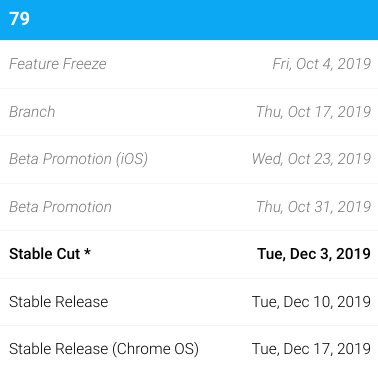
    As it stands now, a fix is planned for Chrome OS 79 although it’s rather late in the software release cycle for that to happen.

    I say that not just because Chrome OS 79 is expected to land in mid-December, but also because there aren’t yet any code changes to actually fix the issue as of today.

    My expectation is that Chrome OS 80 will correct this problem, although it’s possible that code is quickly written and tested in Chrome OS 79. If you want to track this progress, you can star the bug report for updates.

    I know I’m late to the game when using an external monitor with a Chromebook but that’s mainly because I never felt the need to. Since taking some online coding courses, however, the dual-monitor setup is a huge efficiency booster. On my internal Chromebook display, I watch step-by-step video lessons and on the larger external display, I add and test code, providing me more room to navigate many lines of code.

    Kevin Tofel
    • Website

    After spending 15 years in IT at Fortune 100 companies, Kevin turned a hobby into a career and began covering mobile technology in 2003. He writes daily on the industry and has co-hosted the weekly MobileTechRoundup podcast since 2006. His writing has appeared in print (The New York Times, PC Magazine and PC World) and he has been featured on NBC News in Philadelphia.

    Best of AI

    What Does Adobe Firefly AI Do?

    June 16, 2026

    Is Joyland AI Safe For Kids?

    June 12, 2026

    LMArena AI: Chatbot Ranking Platform 2026

    May 27, 2026

    Will AI Take Over the World

    May 25, 2026

    AI21 Jurassic Statistics 2026: Model Size, Usage and AI Performance Trends

    May 19, 2026
    Trending Stats

    Chromebook Repairability Scores Statistics 2026: Hardware Serviceability Reports

    June 22, 2026

    ChromeOS Feature Adoption Rates Statistics 2026: User Adoption Metrics And Data

    June 20, 2026

    Chromebook Storage Usage Statistics 2026: Device Storage Consumption Trends

    June 18, 2026

    Conversational AI Market Statistics 2026: Chatbot Usage And Enterprise Deployment

    June 17, 2026

    Chromebook Gaming Usage Statistics 2026: Player Engagement And Usage Reports

    June 17, 2026
    • About
    • Tech Guest Post
    • Contact
    • Privacy Policy
    • Sitemap
    © 2026 About Chrome Books. All rights reserved.

    Type above and press Enter to search. Press Esc to cancel.