

Close Menu
    Facebook X (Twitter) Instagram
    • About
    • Privacy Policy
    • Write For Us
    • Newsletter
    • Contact
    Instagram
    About ChromebooksAbout Chromebooks
    • Linux
    • News
      • Stats
      • Reviews
    • AI
    • How to
      • DevOps
      • IP Address
    • Apps
    • Business
    • Q&A
      • Opinion
    • Gaming
      • Google Games
    • Blog
    • Podcast
    • Contact
    About ChromebooksAbout Chromebooks
    News

    Chromebooks getting a network diagnostics app; you can get an early look at it now

    Kevin TofelBy Kevin TofelNovember 9, 2020Updated:May 7, 2026No Comments2 Mins Read

    Diagnosing hardware issues on a Chromebook isn’t always easy. There are some Chrome apps to help with this, but they’re going away. That’s the likely reason we’ve seen reports of a new native Diagnostics app in Chrome OS in the works. As part of this effort, the latest Chrome OS Canary Channel release includes a new Connectivity Diagnostics tool. It largely appears to be a refresh of a network connection tool you can actually use today on any Chromebook.

    Here’s a look at the new tool, reported by Android Police:

    You can see there are various network-related tests here to help identify Chromebook connectivity issues. You can also send feedback reports to Google for examination and (hopefully!) identification of the root cause.

    That information is particularly helpful if a large number of connection issues appear on a specific Chromebook model. After resolving the issue, Google could push a software update to those models.

    When I saw the above example above, I actually thought it looked familiar. Indeed, I’ve used a special Chrome OS URL to do some network diagnostics in the past, and you can too, even before the updated tool arrives.

    Just head over to chrome://network where you’ll see several tabs of information, including one called “Network Health” that has the same tests.
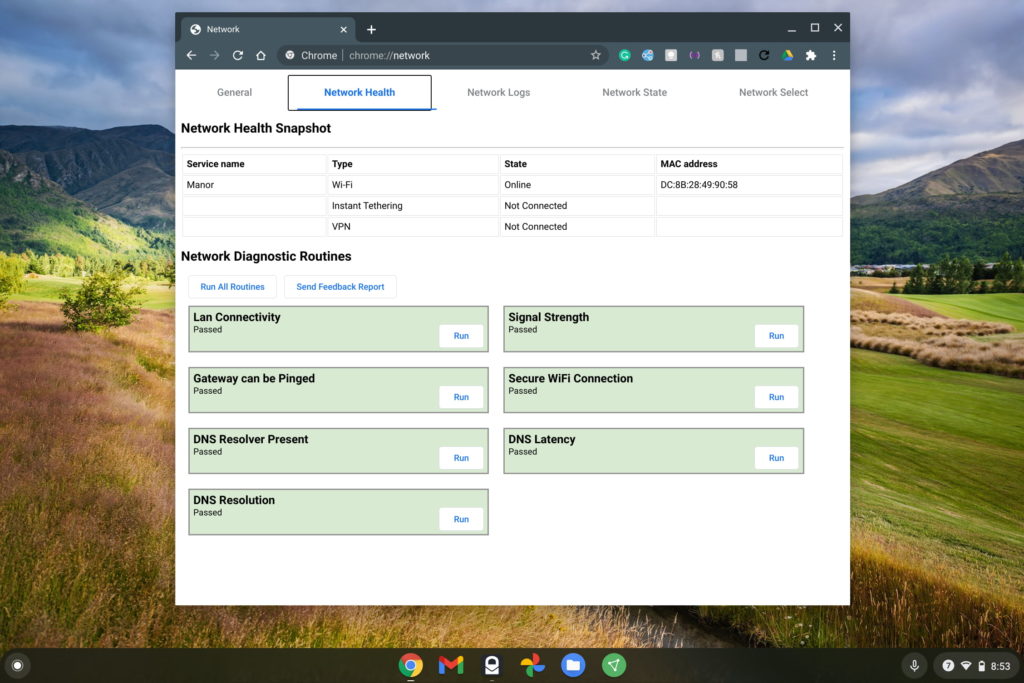
    That screen is the one that most Chrome OS users would need to identify potential network issues. If you really want to dig down and too see detailed data, you can see it in the Network State tab:
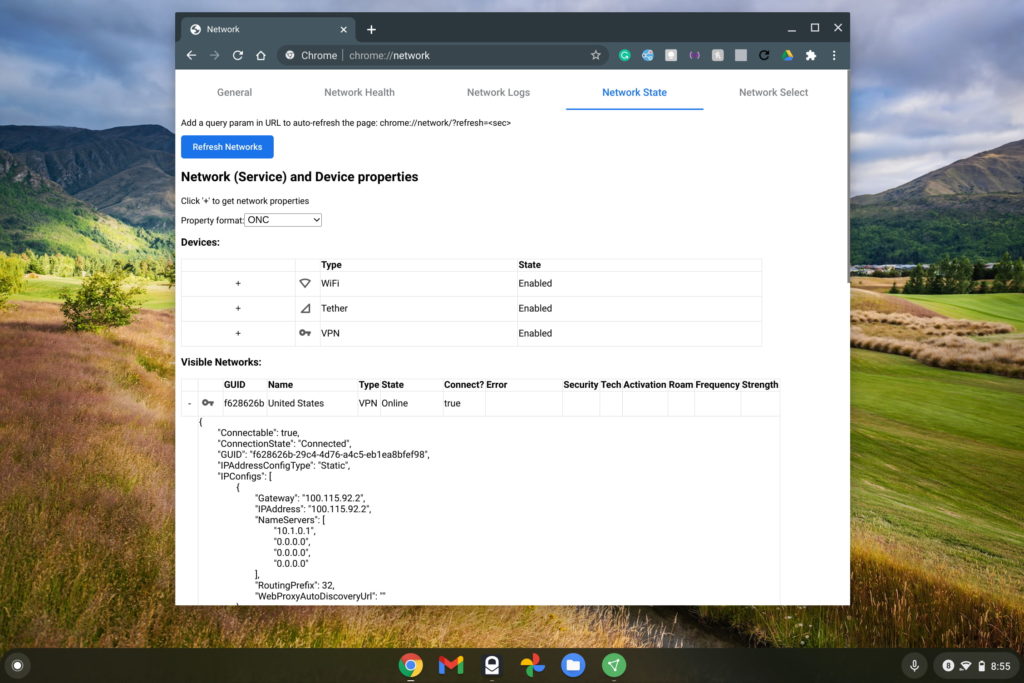
    In the above picture, I’m specifically not expanding too much of the connection data since it shows my Chromebook’s unique MAC address identifier. But there’s plenty of data there as well as in the Network Logs tab, which lists each and every network action a Chromebook takes at the hardware level.

    So the new tool appears to be a fresh coat of paint on the existing Network Diagnostics. That’s fine with me if the tool becomes more accessible and focuses on the basics needed to troubleshoot a Chromebook network connection.

    Kevin Tofel
    • Website

    After spending 15 years in IT at Fortune 100 companies, Kevin turned a hobby into a career and began covering mobile technology in 2003. He writes daily on the industry and has co-hosted the weekly MobileTechRoundup podcast since 2006. His writing has appeared in print (The New York Times, PC Magazine and PC World) and he has been featured on NBC News in Philadelphia.

    Best of AI

    AI21 Jurassic Statistics 2026: Model Size, Usage and AI Performance Trends

    May 19, 2026

    Chub AI Explained

    May 6, 2026

    Stable Diffusion AI: Free Text To Image AI Generator

    May 5, 2026

    Imagen AI: The Best Photo Editing AI In 2026

    April 21, 2026

    Alphafold AI from Google Deepmind 2026

    April 21, 2026
    Trending Stats

    Chromebook Webcam Usage Trends Statistics 2026: Video Calls, Remote Learning And User Behavior

    May 19, 2026

    External Monitor Usage on Chromebooks Statistics 2026

    May 15, 2026

    Chromebook Keyboard Failure Rates Statistics 2026

    May 13, 2026

    Chromebook Boot Failure and Recovery Statistics 2026

    May 7, 2026

    Linux Usage on Chromebooks Statistics 2026

    May 7, 2026
    • About
    • Tech Guest Post
    • Contact
    • Privacy Policy
    • Sitemap
    © 2026 About Chrome Books. All rights reserved.

    Type above and press Enter to search. Press Esc to cancel.