

Close Menu
    Facebook X (Twitter) Instagram
    • About
    • Privacy Policy
    • Write For Us
    • Newsletter
    • Contact
    Instagram
    About ChromebooksAbout Chromebooks
    • Linux
    • News
      • Stats
      • Reviews
    • AI
    • How to
      • DevOps
      • IP Address
    • Apps
    • Business
    • Q&A
      • Opinion
    • Gaming
      • Google Games
    • Blog
    • Podcast
    • Contact
    About ChromebooksAbout Chromebooks
    News

    How to enable Virtual Desk trackpad swipe gestures in Chrome OS 78

    Kevin TofelBy Kevin TofelNovember 12, 2019Updated:September 22, 2025No Comments2 Mins Read

    Although you wouldn’t know this from the release notes, Chrome OS 78 officially brought Virtual Desks to Chromebooks last week. In prior versions of the software, this feature was experimental and required a hidden setting to be enabled.

    However, as noted by John, who commented on a prior post about Chrome OS 78, many people may not see the three- and four-finger swipe gestures for quick navigation between desks. John asked how to enable them and it’s actually quite easy.

    Simply type chrome://flags/#enable-virtual-desks-gestures in the browser of your Chromebook running Chrome OS 78 and select “Enabled” from the dropdown menu for this still-experimental feature. You’ll need to then restart your browser for the new setting to take place.
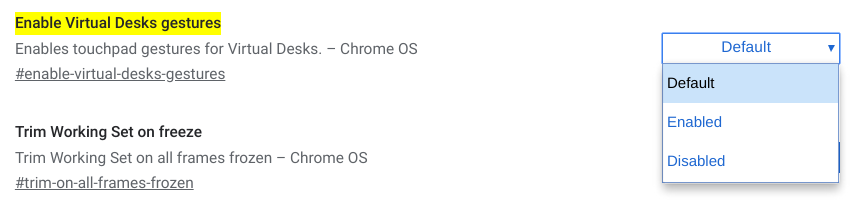
    After the quick browser restart, you’ll have the ability to switch between open Virtual Desks with a three-finger swipe, either left or right depending on the desktop you want to use.

    But wait.

    For a long time now, a three-finger swipe was used in Chrome OS to quickly move between open browser tabs. As it stands right now, that function has been relegated to a four-finger swipe in Chrome OS with this experimental flag turned on.

    In fact, it’s the complete opposite of the original plan: Swiping through desktops was initially going to use the four-finger swipe.

    Don’t panic just yet though. ChromeUnboxed notes that there’s an open bug to reverse the three- and four-finger trackpad gestures in Chrome OS 79.

    We’re looking at a good five or six weeks before that change lands in the Stable Channel, but at least the final implementation won’t require Chromebook users to retrain their brains for tab-scrubbing with three-fingers.

    Kevin Tofel
    • Website

    After spending 15 years in IT at Fortune 100 companies, Kevin turned a hobby into a career and began covering mobile technology in 2003. He writes daily on the industry and has co-hosted the weekly MobileTechRoundup podcast since 2006. His writing has appeared in print (The New York Times, PC Magazine and PC World) and he has been featured on NBC News in Philadelphia.

    Best of AI

    Enterprise AI Spending Statistics 2026: Budgets, ROI, and Industry Data

    July 17, 2026

    Grok AI Statistics 2026: Users, Revenue, Market Share, and Growth Data

    July 15, 2026

    AI in Healthcare Adoption Statistics 2026

    July 9, 2026

    Deepfake Incident Statistics 2026

    July 7, 2026

    Best AI Music and Vocal Tools for Chromebook Users in 2026 

    June 24, 2026
    Trending Stats

    Password Manager Adoption Statistics 2026 [Usage by Region]

    July 21, 2026

    Chromebook Plus Adoption Statistics 2026

    July 20, 2026

    Chromebook vs MacBook Sales Statistics 2026: Shipments, Revenue, and Market Share Data

    July 20, 2026

    Chromebook Chipset Market Share (Intel, AMD, MediaTek, Qualcomm) 2026 Statistics

    July 18, 2026

    Firefox Usage Statistics 2026

    July 17, 2026
    • About
    • Tech Guest Post
    • Contact
    • Privacy Policy
    • Sitemap
    © 2026 About Chrome Books. All rights reserved.

    Type above and press Enter to search. Press Esc to cancel.