


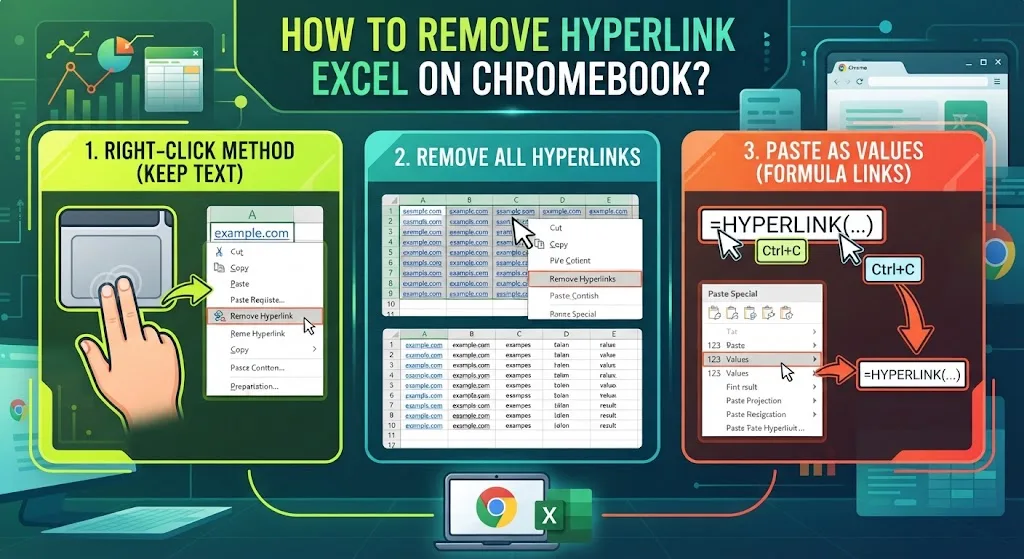
Links pile up in a spreadsheet and get in the way once the file is finished. Excel on ChromeOS runs in the browser or as an Android app, so a few menus sit in different places than they do on Windows. Four fixes cover almost every case: clearing one address, wiping every link in a sheet, stopping links from forming on their own, and opening a link with a plain click.
How to Remove Hyperlink in Excel on Chromebook Without Losing the Text
Right-click the cell holding the link. On ChromeOS that means a two-finger tap on the touchpad, or holding Alt while you click. If neither gesture works, the guide on right-click methods for ChromeOS lists every option.
Pick Remove Hyperlink from the menu. The wording stays in the cell and only the address disappears.
Want the whole entry gone? Select the cell and press Delete. Chromebook keyboards skip that key, so use Alt + Backspace instead, or check where the Delete function hides on a Chromebook keyboard.
Remove Hyperlink in Excel Built With the HYPERLINK Function
Not every link gets typed by hand. Some come from the HYPERLINK function, and the right-click route does nothing to those.
Click the cell holding the formula. Press Ctrl + C to copy it. Right-click again, then paste using the Values option under Paste Special.
What lands in the cell afterwards is plain text with no formula and no address behind it. The copy and paste shortcuts on ChromeOS match Windows, so the keys carry over unchanged.
How to Remove All Hyperlinks in Excel at Once
Select the cells holding links, or press Ctrl + A to grab the entire sheet. Right-click the selection and pick Remove Hyperlinks. Excel strips the lot in one move.
Word and Outlook use a different combination. Press Ctrl + A to select the text, then Ctrl + Shift + F9. Both key pairs are worth memorising, and this list of ChromeOS shortcuts covers the rest.
Chromebooks map some function keys differently. Press Ctrl + Alt + / to check yours, or read how to open the built-in shortcut viewer first.
Stop Excel From Creating Hyperlinks By Itself
Office turns typed web and network addresses into live links while you write. Handy at times, annoying at others. Three steps switch it off.
Open File > Options > Proofing. Outlook takes a longer path: File > Options > Mail > Editor Options > Proofing.
Choose AutoCorrect Options, then open the AutoFormat As You Type tab. Untick the box labelled Internet and network paths with hyperlinks.
New addresses stay as ordinary text after that. One catch for Chromebook users: this panel belongs to the desktop app. Excel in the browser carries a slimmer settings menu and skips it.
Click a Link Without Pressing Ctrl First
Word and Outlook expect you to hold Ctrl as you click a link. The extra step keeps you from landing on a website mid-edit. Turn it off if a plain click suits you better.
In Word, go to File > Options > Advanced. Under Editing Options, untick Use CTRL + Click to follow hyperlink.
Outlook buries the same box deeper: File > Options > Mail > Editor Options > Advanced. Once the tick is gone, a single click opens the address.
Which Excel Version on ChromeOS Changes the Menus
Excel for the web handles Remove Hyperlink and Remove Hyperlinks without trouble. The Android app lays its touch menu out differently, which is why some options look missing rather than absent.
Spreadsheets arriving from Mac users bring their own snag. Those files need converting first, and this walkthrough on what .numbers files are and how to open them explains the route.
Saved links clutter a browser the same way they clutter a workbook. When yours need thinning out, here is how to clear every bookmark in Chrome.
FAQs
How do I remove a hyperlink in Excel but keep the text?
Right-click the cell and select Remove Hyperlink. The wording stays and only the web address is stripped. On a Chromebook, right-click with a two-finger tap or by holding Alt and clicking.
What is the shortcut to remove hyperlinks in Excel?
Excel has no single key combination. Press Ctrl + A to select the sheet, then right-click and choose Remove Hyperlinks. Word and Outlook use Ctrl + A followed by Ctrl + Shift + F9.
Why can’t I remove a hyperlink in Excel on a Chromebook, according to Reddit?
Reddit threads usually trace it to the Android app, where the touch menu hides the option. Opening the same file in Excel for the web restores the standard right-click menu.
Does Reddit recommend paste values for stubborn Excel links?
Yes. Reddit users point to Paste Special with Values for links built by the HYPERLINK function. Copy the cell, paste as values, and the formula and address both disappear.
How do I stop Excel turning typed addresses into links?
Open File > Options > Proofing > AutoCorrect Options. On the AutoFormat As You Type tab, untick Internet and network paths with hyperlinks. Addresses typed afterwards stay as plain text.
