


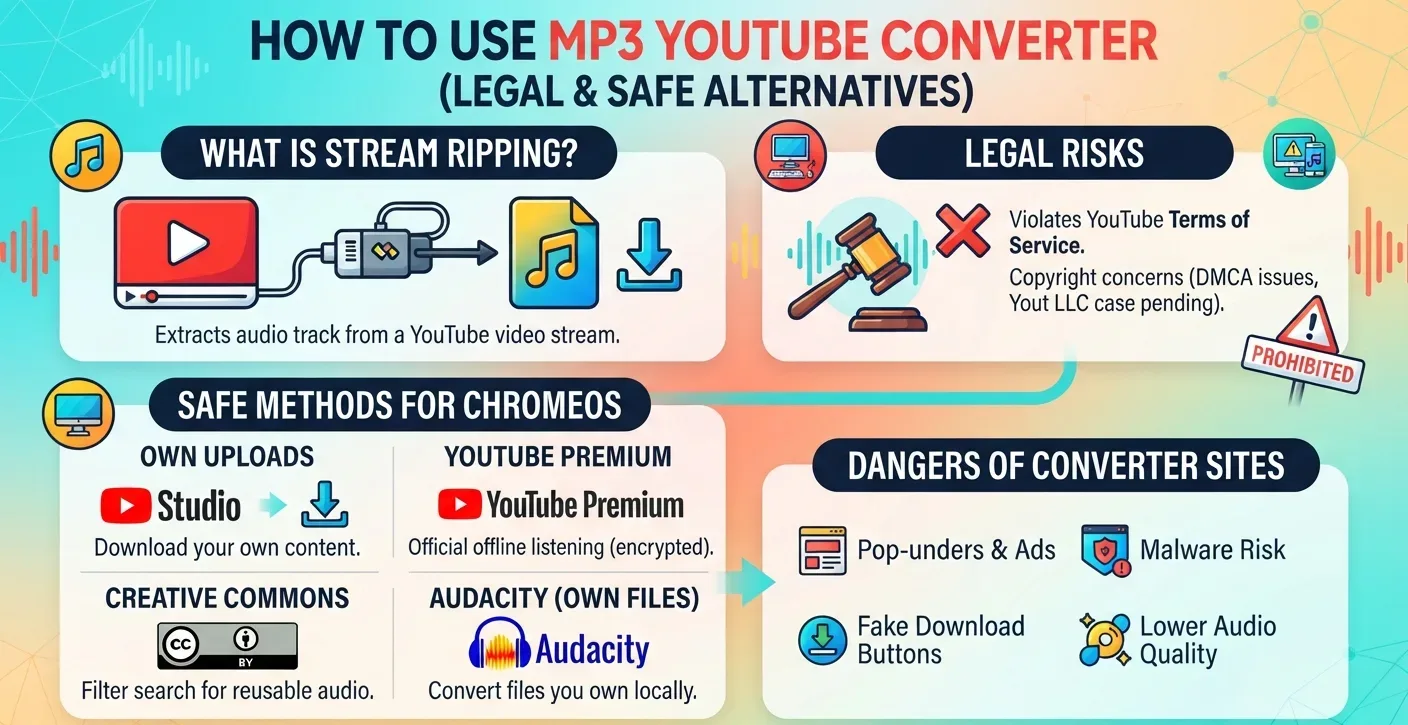
Search for an MP3 YouTube converter and dozens of sites promise a free audio file in two clicks. Most sit in contested legal territory, and one US court has already said so. This guide covers what these tools do, where the law currently stands, and which methods get audio onto a Chromebook without breaking YouTube’s terms.
What an MP3 YouTube Converter Actually Does
YouTube sends video and audio as a stream. It does not hand over the underlying file.
A converter site sits between you and that stream. It fetches the video data, strips the audio track, re-encodes it as MP3, and gives you a download link.
To do that, the tool has to get past YouTube’s rolling cipher, a JavaScript signature system that makes direct file access harder. That single technical step is the reason the legal fight exists.
Stream-ripping use reported by IFPI, 2021
IFPI surveyed listeners across 21 markets and found ripping concentrated among younger users. Among 16-24 year olds, 35% reported using these sites.
Is It Legal To Use an MP3 YouTube Converter?
YouTube’s terms of service prohibit downloading content unless the platform shows a download button for it. Using a third-party converter breaks that agreement regardless of what you do with the file afterward.
Copyright law is the bigger problem. In 2022, Connecticut district judge Stefan Underhill dismissed a suit brought by Yout LLC, which had asked the court to declare its ripping service lawful. His 46-page ruling found Yout had not shown it avoided circumventing YouTube’s protection measures under Section 1201 of the DMCA.
Yout appealed. The Second Circuit has not issued a final decision, so the question of whether the rolling cipher counts as a technological protection measure remains open.
Personal use is not a blanket defense. The DMCA’s anti-circumvention rules apply separately from fair use, which is why the Yout case turned on the cipher rather than on what users did with the files.
Share of traffic to music piracy sites by method, 2021
Muso recorded stream ripping as the largest single category, ahead of unlicensed streaming and direct web downloads.
How To Use MP3 YouTube Converter Alternatives on a Chromebook
Four routes give you audio without touching a ripping site. Each one works on ChromeOS.
Download your own uploads from YouTube Studio
If you published the video, YouTube Studio lets you download the original file. Open the Content tab, click the three-dot menu beside any video, and select Download.
The file arrives as MP4. You can extract the audio locally afterward, and it will land in the Downloads folder on ChromeOS by default.
Use YouTube Premium for offline listening
YouTube Premium and YouTube Music Premium both support offline downloads inside the app. Google’s documentation states downloads stay available for up to 30 days without a connection before the app needs to reconnect.
These files are encrypted and locked to the app. You cannot move them into a music player, but for commuting or flights they solve the same problem. Subscribers to other services can compare this against Apple Music on ChromeOS.
Filter YouTube search for Creative Commons audio
YouTube has a built-in licence filter. Run a search, open Filters, and select Creative Commons under Features.
Results carry a CC BY licence, which permits reuse with attribution. YouTube’s own Audio Library offers a second option, with tracks cleared for download and use in projects.
Convert files you already own to MP3
For video or audio you hold rights to, Audacity handles conversion offline. Install it through the Linux environment, then export as MP3 at your chosen bitrate.
Setting this up takes a few minutes. Our walkthrough on how to set up the Linux container covers the steps, and you can also browse other Play Store apps worth installing for lighter editing work.
Risks of Free YouTube to MP3 Converter Sites
Beyond copyright, these sites carry practical problems. Revenue comes from ad networks that accept low-quality inventory, which means pop-unders, fake download buttons, and redirect chains.
Audio quality is capped by the source. YouTube serves compressed AAC, so re-encoding to MP3 adds a second round of loss. A 320 kbps output from a 128 kbps stream does not recover anything.
Storage fills fast on ChromeOS. Most Chromebooks ship with 32GB to 128GB, so it helps to change where saved files land or clear out old downloads before they pile up.
Anything you keep long term belongs off the local drive. Our guide on how to move the files to Google Drive explains the sync options, and you can find them in the Files app afterward.
FAQs
Is it legal to convert YouTube to MP3?
No, in most cases. Converting breaks YouTube’s terms of service, and a US district court ruled in 2022 that bypassing YouTube’s rolling cipher likely violates DMCA Section 1201. That case is still on appeal.
What do Reddit users say about YouTube to MP3 converters?
Reddit threads on r/Piracy and r/techsupport repeatedly flag malvertising, fake download buttons, and redirect chains on free converter sites. Several subreddits restrict or remove posts naming specific ripping services because of legal exposure.
Does YouTube allow MP3 downloads?
Not as MP3 files. YouTube Premium and YouTube Music Premium offer encrypted offline downloads inside their apps. Creators can download their own uploads through YouTube Studio, which delivers MP4 rather than audio-only.
How do I get YouTube audio on a Chromebook safely?
Use YouTube Premium for offline playback, download your own uploads from YouTube Studio, or filter search results for Creative Commons tracks. For files you own, convert them locally with Audacity through the Linux environment.
Is the Reddit-recommended yt-dlp method any different legally?
No. Command-line tools that Reddit users recommend perform the same circumvention as browser-based converters. The RIAA issued takedown notices against similar tools in 2020. Switching interfaces does not change the legal position.
