

Close Menu
    Facebook X (Twitter) Instagram
    • About
    • Privacy Policy
    • Write For Us
    • Newsletter
    • Contact
    Instagram
    About ChromebooksAbout Chromebooks
    • Linux
    • News
      • Stats
      • Reviews
    • AI
    • How to
      • DevOps
      • IP Address
    • Apps
    • Business
    • Q&A
      • Opinion
    • Gaming
      • Google Games
    • Blog
    • Podcast
    • Contact
    About ChromebooksAbout Chromebooks
    News

    Google Classroom gains Quizzes in Forms and better class resource management tools

    Kevin TofelBy Kevin TofelJune 25, 2018No Comments2 Mins Read

    Google introduced some updates to Classroom today, making it easier for teachers to create online quizzes while reducing student distractions. The new quizzes feature arrives in the fall to coincide with the upcoming school year.

    Quizzes will use Google Forms and will also include a “locked mode”. When locked down, students will only be able to access the quiz, meaning they can’t surf online or use other apps when taking the quiz. Note that the locked-down mode is only available on managed Chromebooks, although I can’t imagine that a high percentage of school districts deploy unmanaged Chromebooks.
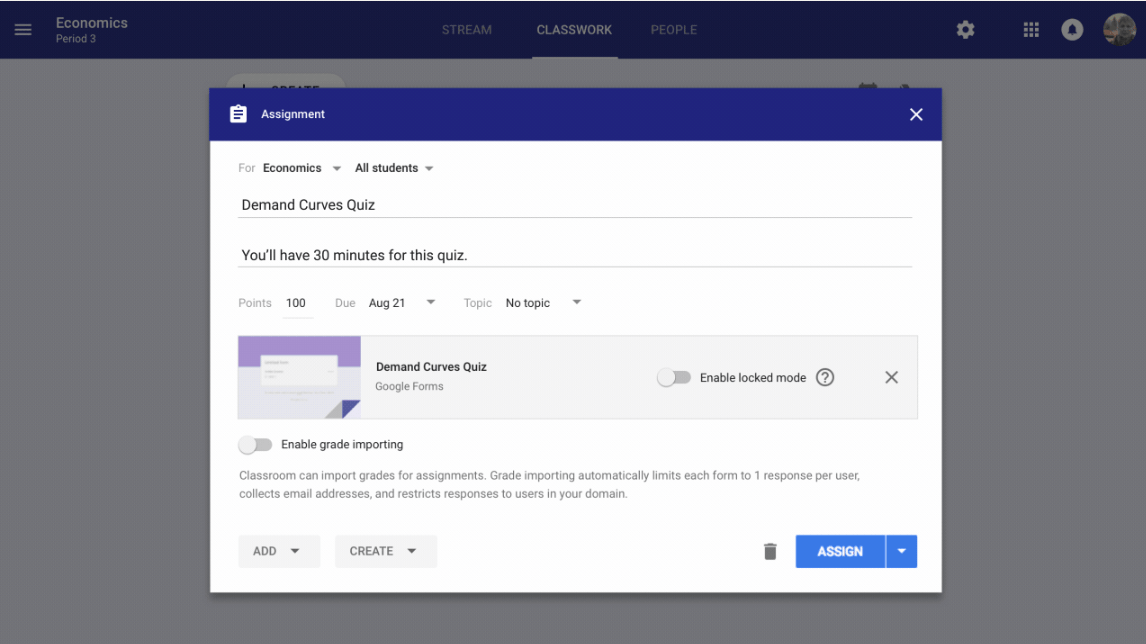
    Google Classroom Quizzes form

    Google Classroom currently includes a Stream showing resources for every class but feedback suggests it can be overwhelming over time. So Classroom will break assignments out of the Stream into a dedicated Classwork view for improved organization.

    Classwork will support organization by date — which is the current method — but also let teachers group topics and units. Teachers will also gain more granular controls for managing Classroom People, including co-teachers, students and guardians.

    Google has quickly earned the majority of education devices, mainly due to school usage of Chromebooks. Without supporting services that educators need, however, that advantage could be short lived, so it’s good to see Google accepting feedback and improving upon its existing Classroom services. Kids who have their Chromebooks locked down to take a pop quiz may disagree, of course. 😉

    Kevin Tofel
    • Website

    After spending 15 years in IT at Fortune 100 companies, Kevin turned a hobby into a career and began covering mobile technology in 2003. He writes daily on the industry and has co-hosted the weekly MobileTechRoundup podcast since 2006. His writing has appeared in print (The New York Times, PC Magazine and PC World) and he has been featured on NBC News in Philadelphia.

    Best of AI

    What Does Adobe Firefly AI Do?

    June 16, 2026

    Is Joyland AI Safe For Kids?

    June 12, 2026

    LMArena AI: Chatbot Ranking Platform 2026

    May 27, 2026

    Will AI Take Over the World

    May 25, 2026

    AI21 Jurassic Statistics 2026: Model Size, Usage and AI Performance Trends

    May 19, 2026
    Trending Stats

    Chromebook Repairability Scores Statistics 2026: Hardware Serviceability Reports

    June 22, 2026

    ChromeOS Feature Adoption Rates Statistics 2026: User Adoption Metrics And Data

    June 20, 2026

    Chromebook Storage Usage Statistics 2026: Device Storage Consumption Trends

    June 18, 2026

    Conversational AI Market Statistics 2026: Chatbot Usage And Enterprise Deployment

    June 17, 2026

    Chromebook Gaming Usage Statistics 2026: Player Engagement And Usage Reports

    June 17, 2026
    • About
    • Tech Guest Post
    • Contact
    • Privacy Policy
    • Sitemap
    © 2026 About Chrome Books. All rights reserved.

    Type above and press Enter to search. Press Esc to cancel.