


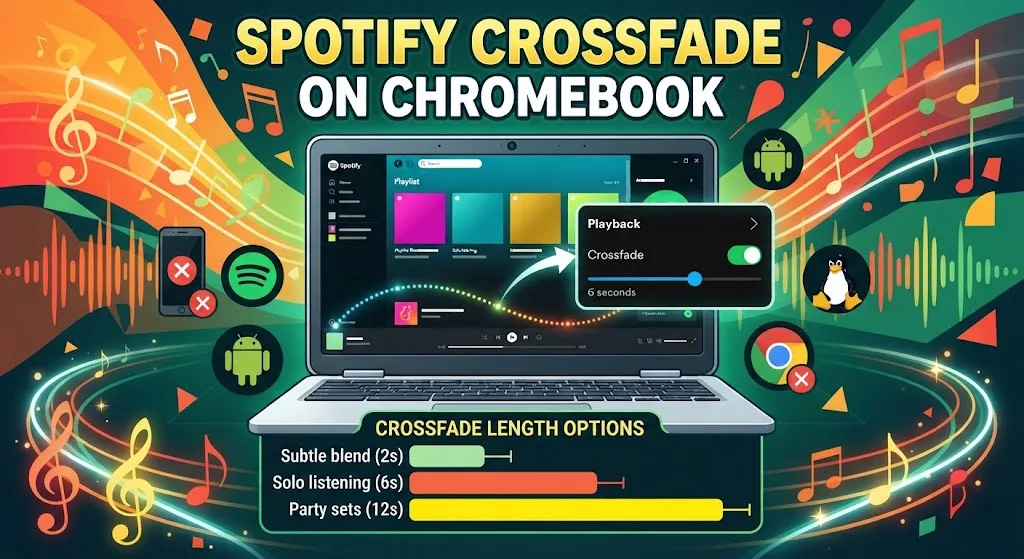
Spotify crossfade blends the tail of one track into the opening of the next, so playback never drops to silence. On a Chromebook the setting is easy to miss, because the version of Spotify you run decides whether the control appears at all. Here is where the slider sits, what length to pick, and what to do when Playback settings are nowhere to be found.
How to Turn On Spotify Crossfade on a Chromebook
Crossfade lives inside Playback settings. Only the app builds of Spotify expose that menu, which is the root of most Chromebook confusion.
Spotify Android app on ChromeOS
Open Spotify from the Launcher and tap Home. Select the gear icon to reach Settings, then open Playback.
Find Crossfade and drag the slider to the length you want. Every playlist then runs as one continuous stretch of audio.
Most Chromebooks released from 2018 onward run Play Store titles, so the fastest route is to install the Spotify Android app. If the Play Store icon is missing from your Launcher, check whether Android app support is switched on in ChromeOS settings first.
Spotify desktop app through Linux
Chromebooks running the Linux environment can install the Debian build of Spotify. Click the arrow beside your account name at the top right, open Settings, scroll to Playback, and switch Crossfade songs on.
Want to confirm it took effect? Start any track, drag the progress marker close to the end, and listen for the overlap.
Spotify web player on ChromeOS
The web player at open.spotify.com does not offer crossfade. Spotify moderators have confirmed this across community threads for years, and the Settings panel there is limited to items like language and streaming quality.
No workaround exists inside the browser. Switching to the Android or Linux build is the only fix.
Best Spotify Crossfade Setting for Your Playlists
The slider runs from 1 second up to 12. One value will not suit every playlist, so expect to adjust it now and then.
At 12 seconds, the next track starts while 12 seconds still remain on the current one. That handover is obvious, which suits party sets where each change should register.
Around 5 or 6 seconds tends to feel right for solo listening on a laptop. Below 2 seconds the two tracks barely touch, and the effect stops being worth the setting.
Your ear settles this. Test values across the full range and keep whichever one stops pulling your attention.
Gapless Playback and Automix Beside Spotify Crossfade
Gapless sits in the same Playback menu. Rather than melting two tracks together, it deletes the quiet stretch between them.
Automix goes further and runs on select Spotify playlists. It can trim intros and outros, add effects, and repeat sections so each transition lands cleaner.
All three toggles stay locked while Spotify Connect pushes audio to a second device. Keep playback on the Chromebook itself if you want them active.
Equalizer Settings to Pair With Spotify Crossfade
Spotify includes an Equalizer that raises or lowers treble and bass. On the Android app, Settings holds an Equalizer entry under Music Quality, which hands off to the system audio menu.
Not every device offers that handoff, and any change may alter how other apps sound. The web player has no Equalizer at all, though adding a Chrome extension covers browser playback.
Volume Normalization Alongside Spotify Crossfade
Premium accounts include volume levelling, which pulls loud and quiet tracks closer together. Open Settings, choose Playback, and enable Audio Normalization.
Three presets follow. Loud suits noisier rooms but flattens the sound. Normal is the default pick, and Quiet fits softer spaces.
These presets also grey out during Spotify Connect sessions. If the ceiling still feels low afterwards, a tool that pushes output past the ChromeOS maximum can help, and pairing a Bluetooth speaker usually beats software gain.
Why Spotify Crossfade Is Not Working on Chromebook
Three causes account for nearly every report. The first is the web player, which never had the feature.
The second is Spotify Connect. Sending audio to a phone, speaker, or TV disables crossfade, gapless, and normalization until playback returns to the Chromebook.
The third is a managed device. School and work Chromebooks often block the Play Store outright, which rules out the Android app. If the transitions sound broken rather than absent, the fault may sit with ChromeOS audio itself rather than Spotify. Our roundup of Android titles worth keeping on ChromeOS covers alternatives if Spotify keeps misbehaving.
FAQs
What does crossfade do on Spotify?
Crossfade overlaps the end of the current track with the start of the next one. The two blend for a set number of seconds, removing silence between songs.
Why is there no Playback setting in my Spotify settings?
You are using the Spotify web player, which omits Playback options entirely. Install the Android app from the Play Store or the Linux desktop build to see Crossfade, Gapless, and Automix.
What is the best crossfade length on Spotify?
Around 5 to 6 seconds suits solo listening. Use 12 seconds for parties where each transition should stand out, and 2 seconds when you want the blend to stay subtle.
Does Spotify crossfade work with Spotify Connect?
No. Crossfade, gapless playback, and volume normalization all switch off while Spotify Connect streams to another device. Play directly on the Chromebook to keep them running.
Can I use crossfade on Spotify Free?
Yes. Crossfade is available on free accounts in the mobile and desktop apps. Volume normalization presets, however, require Spotify Premium.
