

Close Menu
    Facebook X (Twitter) Instagram
    • About
    • Privacy Policy
    • Write For Us
    • Newsletter
    • Contact
    Instagram
    About ChromebooksAbout Chromebooks
    • News
      • Stats
    • AI
    • How to
      • DevOps
      • IP Address
    • Apps
    • Business
    • Q&A
      • Opinion
    • Gaming
      • Google Games
    • Blog
    • Podcast
    • Contact
    About ChromebooksAbout Chromebooks
    News

    How to enable Virtual Desk trackpad swipe gestures in Chrome OS 78

    Kevin TofelBy Kevin TofelNovember 12, 2019Updated:September 22, 2025No Comments2 Mins Read
    Share
    Facebook Twitter LinkedIn Pinterest

    Although you wouldn’t know this from the release notes, Chrome OS 78 officially brought Virtual Desks to Chromebooks last week. In prior versions of the software, this feature was experimental and required a hidden setting to be enabled.

    However, as noted by John, who commented on a prior post about Chrome OS 78, many people may not see the three- and four-finger swipe gestures for quick navigation between desks. John asked how to enable them and it’s actually quite easy.

    Simply type chrome://flags/#enable-virtual-desks-gestures in the browser of your Chromebook running Chrome OS 78 and select “Enabled” from the dropdown menu for this still-experimental feature. You’ll need to then restart your browser for the new setting to take place.
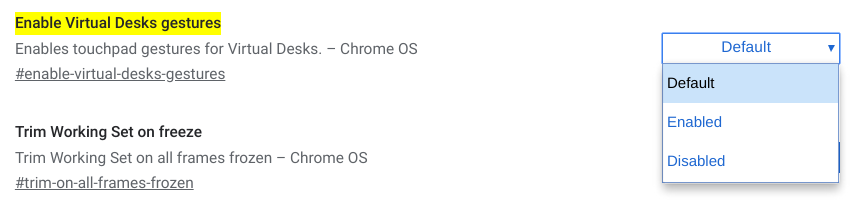
    After the quick browser restart, you’ll have the ability to switch between open Virtual Desks with a three-finger swipe, either left or right depending on the desktop you want to use.

    But wait.

    For a long time now, a three-finger swipe was used in Chrome OS to quickly move between open browser tabs. As it stands right now, that function has been relegated to a four-finger swipe in Chrome OS with this experimental flag turned on.

    In fact, it’s the complete opposite of the original plan: Swiping through desktops was initially going to use the four-finger swipe.

    Don’t panic just yet though. ChromeUnboxed notes that there’s an open bug to reverse the three- and four-finger trackpad gestures in Chrome OS 79.

    We’re looking at a good five or six weeks before that change lands in the Stable Channel, but at least the final implementation won’t require Chromebook users to retrain their brains for tab-scrubbing with three-fingers.

    Chrome OS Chrome OS 78 Chrome OS 79 Gestures Productivity Virtual Desks
    Share. Facebook Twitter Pinterest LinkedIn Tumblr
    Kevin Tofel
    • Website

    After spending 15 years in IT at Fortune 100 companies, Kevin turned a hobby into a career and began covering mobile technology in 2003. He writes daily on the industry and has co-hosted the weekly MobileTechRoundup podcast since 2006. His writing has appeared in print (The New York Times, PC Magazine and PC World) and he has been featured on NBC News in Philadelphia.

    Related Posts

    Auto DraftStarbucks Partner Hours: Manual to Managing Work Schedules

    January 26, 2026

    Anon Vault For Private Cloud Storage

    January 23, 2026

    How To Use SFM Compile For Manual Model Conversion

    January 15, 2026

    Comments are closed.

    Best of AI

    Chub AI Statistics And User Trends 2026

    February 5, 2026

    Make-A-Video Statistics 2026

    January 30, 2026

    Stable Video Diffusion User Trends And Statistics 2026

    January 29, 2026

    VALL-E Statistics 2026

    January 28, 2026

    StarCoder Statistics And User Trends 2026

    January 27, 2026
    Trending Stats

    Google Penalty Recovery Statistics 2026

    January 30, 2026

    Search engine operators Statistics 2026

    January 29, 2026

    Most searched keywords on Google

    January 27, 2026

    Ahrefs Search Engine Statistics 2026

    January 19, 2026

    Pay Per Click Advertising Statistics 2026

    January 16, 2026
    • About
    • Write For Us
    • Contact
    • Privacy Policy
    • Sitemap
    © 2026 About Chrome Books. All rights reserved.

    Type above and press Enter to search. Press Esc to cancel.