


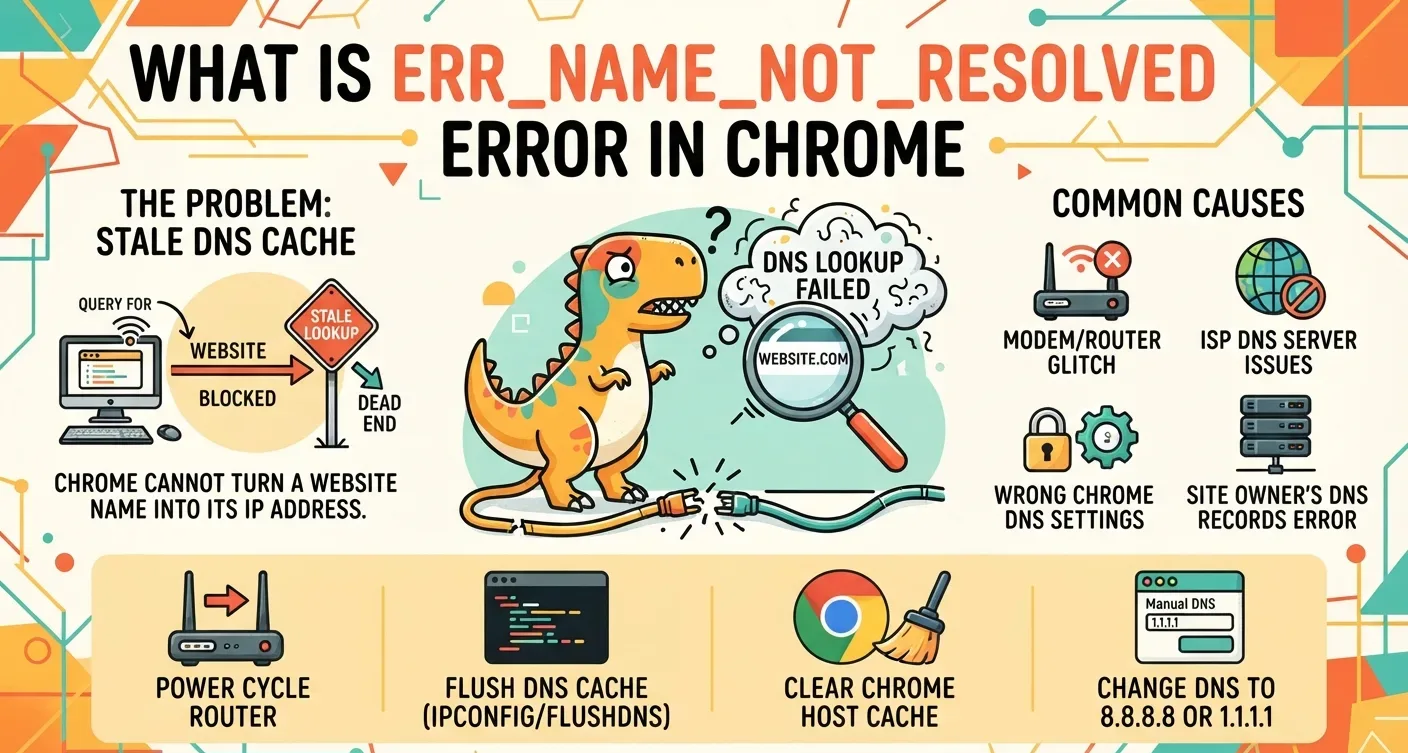
Chrome shows err_name_not_resolved when it cannot turn a website’s name into the numeric IP address of its server. DNS does that translation. When the lookup comes back empty, Chrome never opens a connection and the page stays blank.
Most cases start on the visitor’s side, with stale cached records or a stuck router. Site owners run into it after bad DNS records, wrong nameservers or an expired domain. The steps below are current as of September 2026.
What err_name_not_resolved Means in Chrome
Every site lives at a numeric IP address. DNS pairs the name you type with that number, the way a phone contact list pairs a name with digits.
Chromium’s network error list gives this failure the code -105, defined as a host name that could not be resolved. Brave and Edge run on Chromium, so they print the same code.
Firefox reports “Server Not Found” for the same fault. Safari uses its own wording. All of them mean one thing: the browser never learned where the site lives.
What Causes ERR_NAME_NOT_RESOLVED in Chrome
| Side | Cause | What happens |
|---|---|---|
| Visitor | Stale cached lookups | Chrome heads to an old, dead IP |
| Visitor | Modem-router glitch | It keeps serving faulty ISP lookups |
| Visitor | ISP block | Some domains get stopped, at times by region |
| Visitor | Proxy or VPN | Queries get misrouted or delayed |
| Visitor | Android Private DNS | An unreachable resolver breaks every app |
| Owner | Wrong A, AAAA or CNAME records | The name points somewhere else |
| Owner | Cloudflare settings | Bad proxy options or failed server contact |
| Owner | Lapsed registration | The registrar pulls the nameservers |
| Owner | DNSSEC mistake | Faulty keys block lookups despite correct records |
| Owner | Propagation | New edits can take two days to reach everyone |
A quick test splits the two sides. If the site opens on mobile data or on another device, the problem is local. If it fails everywhere, look at the domain.
No site loading at all points to something else. An offline device makes Chrome report net::err_internet_disconnected before any lookup starts.
How to Fix ERR_NAME_NOT_RESOLVED in Chrome: 8 Steps for Visitors
Step 1: Recheck the Address
One extra letter, a missing one or the wrong ending leads nowhere. Typing gooogle.com instead of google.com is enough to trigger the error.
Step 2: Power Cycle the Modem-Router
Unplug it, wait 30 seconds and plug it back in. Refresh the page once the connection is back.
On a Chromebook, the same router trouble can show up as a DHCP lookup failed error rather than a DNS code.
Step 3: Flush the DNS Cache on Windows, macOS and Linux
| System | Command | Then |
|---|---|---|
| Windows | ipconfig /flushdns, then netsh winsock reset | Restart the PC |
| macOS | sudo dscacheutil -flushcache; sudo killall -HUP mDNSResponder | Enter your admin password |
| Linux | resolvectl flush-caches | Cache statistics should read zero |
The winsock reset rebuilds Windows networking software. Skip the restart and it won’t take effect.
Step 4: Clear Chrome’s Own Host Cache
Chrome stores DNS answers apart from the operating system. Open chrome://net-internals/#dns and press Clear host cache.
Then open the Sockets tab and press Flush socket pools to close stale connections. Relaunch Chrome. This walkthrough of the net-internals DNS page explains when the flush helps and when it won’t.
Step 5: Switch to 1.1.1.1 or 8.8.8.8
ISP resolvers can fail, lag under heavy load or block sites. Cloudflare runs 1.1.1.1 and Google runs 8.8.8.8, both free.
Windows 11: Settings > Network & internet > Wi-Fi or Ethernet > DNS server assignment > Edit. Choose Manual, turn on IPv4, enter one resolver and save.
Mac (Ventura and newer): System Settings > Network > your connection > Details > DNS. Press +, add the resolver, confirm with OK.
ChromeOS: Settings > Network > your network > Network, then set Name servers to Custom.
Step 6: Check Chrome’s Secure DNS and Preload Settings
Secure DNS sends lookups over HTTPS to a provider you pick. If that provider can’t be reached, names fail even on a working connection.
Go to Settings > Privacy and security > Security and find Use secure DNS. Set it to your current service provider, or switch it off for a test.
Page preloading resolves domains in the background too. Type “preload” into the settings search box and turn it off to rule it out.
Step 7: Pause the VPN, Proxy or Antivirus
A slow or strict VPN server upsets lookups. Some antivirus programs add DNS monitors that stop safe queries. Turn each tool off briefly and reload.
Page opens? Change the VPN region or allow-list the site. School and work Chromebooks often route through a proxy, and you can switch the proxy off in network settings if the device isn’t managed.
A VPN that drops mid-session can leave a proxy entry behind. That leftover usually surfaces as ERR_TUNNEL_CONNECTION_FAILED instead.
Step 8: Remove the Site from the Hosts File
The hosts file overrides DNS. A site mapped there to an unused IP never loads.
Windows: open Notepad as administrator, choose File > Open and paste C:\Windows\System32\drivers\etc. Set the filter to show all files, open hosts, delete the site’s line and save.
Mac: run sudo nano /private/etc/hosts and enter your password. Delete the line, then press Control + O, Enter and Control + X.
Fixing err_name_not_resolved in Chrome on Android
Android’s Private DNS pushes every app through one resolver. When that resolver goes down, nothing loads.
Open Settings > Network & internet > Private DNS and pick Automatic or Off. Still stuck? Turn Airplane mode on and off, then clear Chrome’s cache.
Moving from Wi-Fi to mobile data works as a stopgap. A lasting fix still needs a cache flush or new DNS settings.
Site Owner Fixes When Every Visitor Sees err_name_not_resolved
A, AAAA and CNAME Records Plus Nameservers
Each A record needs the IPv4 address from your host. Add AAAA for IPv6, and point subdomain CNAMEs at the right targets.
Migrations and typos leave nameservers wrong. Enter them exactly as the host supplied, usually in an ns1.yourhost.com and ns2.yourhost.com format.
Cloudflare’s Orange Cloud
An orange icon beside an A or CNAME record means proxying is on. Click it once to turn it gray (DNS only) and reload after a few minutes.
If the site loads, review SSL settings or purge Cloudflare’s cache. If it still fails, contact your host.
Expired Domains and DNSSEC Keys
Check the domain’s status and expiry at your registrar, such as Namecheap. After renewal, allow several hours.
DNSSEC signs records with crypto keys. Switching host or DNS provider without updating those keys breaks resolution. Disable DNSSEC, wait for the site to return, create new DS records with the current host, then turn it back on.
Propagation Up to 48 Hours
Edits usually spread within hours but can take two days. A mix of green ticks and red crosses on DNSChecker means the change is still moving.
ERR_NAME_NOT_RESOLVED vs DNS_PROBE_FINISHED_NXDOMAIN and Related Chrome Codes
ERR_NAME_NOT_RESOLVED is the general result for a failed lookup. DNS_PROBE_FINISHED_NXDOMAIN shows after Chrome runs its own probe and gets a firm answer that the domain does not exist.
| Code | Meaning |
|---|---|
| DNS_PROBE_FINISHED_NXDOMAIN | Lookup finished; no such domain exists |
| ERR_CONNECTION_TIMED_OUT | IP found, but the server replied too slowly |
| ERR_CONNECTION_REFUSED | Server rejected Chrome, often due to a firewall or downtime |
| DNS_PROBE_FINISHED_NO_INTERNET | Device offline, so the lookup never began |
A cache flush and a resolver switch help with most of these. Timeouts on ChromeOS follow a close sequence, set out in these err_timed_out fixes for Chromebooks.
When a server connects but sends nothing back, Chrome prints a separate code, covered in this guide to fixing net::err_empty_response.
FAQs
Is ERR_NAME_NOT_RESOLVED caused by a virus?
Rarely. Stale DNS data, a VPN or firewall rules cause most cases. Malware can edit the hosts file to block sites, so check that file if many domains fail at once.
Why does ERR_NAME_NOT_RESOLVED appear on only one website?
One failing site points to a stale cached record, a hosts file entry for that domain, or broken DNS records on the owner’s side. Load the site on mobile data to tell them apart.
What fix do Reddit users recommend for ERR_NAME_NOT_RESOLVED?
Threads on r/techsupport and r/chrome most often suggest switching DNS to 8.8.8.8 or 1.1.1.1, then running ipconfig /flushdns. Turning off a VPN comes up as the next most common fix.
Why does the error continue after switching to 1.1.1.1?
Cloudflare’s resolver may be down, or your ISP may block outside resolvers. Try 8.8.8.8. If pages load, the fault sat with Cloudflare.
Does a VPN fix ERR_NAME_NOT_RESOLVED, as some Reddit posts claim?
Sometimes. A VPN routes lookups through different resolvers and skips a failing ISP server. A slow or strict VPN can also cause the error, so test with it on and off.
