


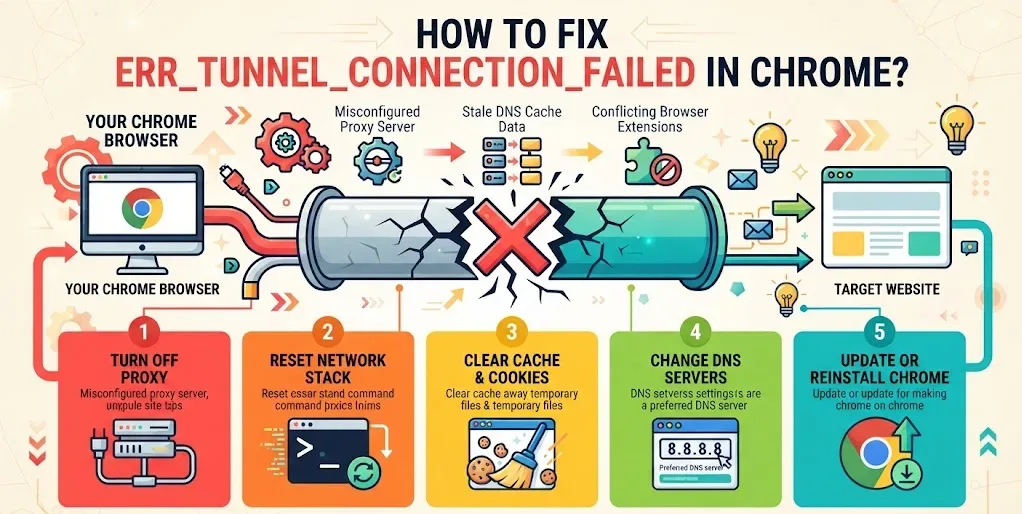
err_tunnel_connection_failed appears in Chrome when the browser cannot get a usable reply back through a proxy server. The page stops before it ever reaches the site you typed. Most of the time the fault sits in your own network settings, not on the server. Five fixes cover almost every case, and they work best in order.
What err_tunnel_connection_failed means in Chrome
Chrome opens a tunnel when encrypted traffic has to pass through a proxy. The proxy takes that request, forwards it, and hands the answer back.
When the answer never arrives in a form Chrome can read, the browser stops and prints the code. The site itself is often fine. Load it on a phone using mobile data and it usually appears without trouble.
The code belongs to the same family as ERR_EMPTY_RESPONSE, where a server accepts the request and then sends nothing back.
What causes err_tunnel_connection_failed
Four setups trigger it most often:
- A proxy server that is switched on, misconfigured, or no longer running
- DNS entries pointing at an address that has since moved
- Cached site data and cookies Chrome keeps reusing
- A VPN, firewall rule, or extension sitting between Chrome and the proxy
Office and school networks add a fifth cause. An administrator has blocked the address deliberately, and nothing on your end will change that.
Fix 1: Turn off the proxy causing err_tunnel_connection_failed
Open Chrome’s menu and pick Settings. Scroll to the System block and click the option that opens your computer’s proxy settings. Move to the Connections tab, then press the button for LAN settings.
Tick the box that lets Windows detect settings automatically. Clear the tick beside the proxy server entry, press OK, and restart the machine.
Our guide to proxy settings inside Chrome explains each box in that window. Chromebook owners should switch the proxy off in ChromeOS instead, where the controls live under the network you joined.
Fix 2: Reset the network stack to clear err_tunnel_connection_failed
This returns Windows networking to a clean state from an elevated command window.
Type cmd in the search bar, right-click the Command Prompt result, and run it as administrator. Enter these four commands one at a time:
ipconfig /flushdnsnbtstat -rnetsh int ip resetnetsh winsock reset
Restart once all four finish. The same reset helps with pages that time out before they load.
Fix 3: Clear cache and cookies behind err_tunnel_connection_failed
Files the browser saved earlier can keep sending requests down a dead proxy route.
Open chrome://settings/cookies and remove all site data. Then open the delete browsing data panel, tick every option in it, and confirm.
Close Chrome and reopen it before testing the page again. The full method for clearing cache and cookies lists the keyboard shortcut if you would rather skip the menus.
Fix 4: Change DNS servers to fix err_tunnel_connection_failed
Handing the connection a public resolver rules out a stale DNS record.
Right-click the network icon at the bottom right and open Network and Sharing Center. Select your active connection, press Properties, then double-click Internet Protocol Version 4 (TCP/IPv4).
Choose the option that lets you enter addresses by hand. Set the preferred server to 8.8.8.8 and the alternate to 8.8.4.4, press OK, and close the window.
Chrome keeps a host cache of its own. Clear it at chrome://net-internals/#dns. On ChromeOS a resolver fault often surfaces as DHCP lookup failed rather than a tunnel error.
Fix 5: Update Chrome or install it again
With the network clean, the browser is the last suspect.
Click the three-dot icon, go to Help, then About Google Chrome. Chrome checks for a newer build by itself and installs one if it exists.
When no update is waiting, uninstall Chrome and install a fresh copy. Older builds also produce SSL version interference and certificate date warnings on sites that have tightened their security since.
How to fix err_tunnel_connection_failed on a Chromebook
ChromeOS has no Command Prompt, so the netsh commands do not apply here.
Open Settings, select your Wi-Fi network, scroll to Proxy, and set it to direct internet connection. Clear browsing data next, then restart the device.
Extensions deserve a test after that. Load the page in an incognito window, where extensions stay off by default. Extension conflicts also sit behind STATUS_ACCESS_VIOLATION on ChromeOS.
FAQs
What does err_tunnel_connection_failed mean?
It means Chrome could not open a working tunnel through a proxy server. The request stops at the proxy step. The website you typed is usually online and reachable from a different network.
Is err_tunnel_connection_failed a virus?
No. The code reports a failed proxy or DNS connection and nothing else. Malware can alter proxy settings and cause it, but the error on its own is not proof of an infection.
Why do Reddit users blame VPNs for err_tunnel_connection_failed?
Reddit threads often trace it to a VPN that dropped mid-session and left its proxy entry behind. Disconnecting the VPN, then clearing that leftover proxy setting, restores normal browsing in most reports.
Does incognito mode fix err_tunnel_connection_failed?
Not permanently. Incognito disables extensions by default, so a page that loads there points at an extension conflict. Switch extensions off one at a time in a normal window to find it.
Can the website cause err_tunnel_connection_failed?
Rarely. Reddit posts and support forums show most cases starting with local proxy or DNS settings. If the page fails on a second device and a second network, the host is at fault.
