


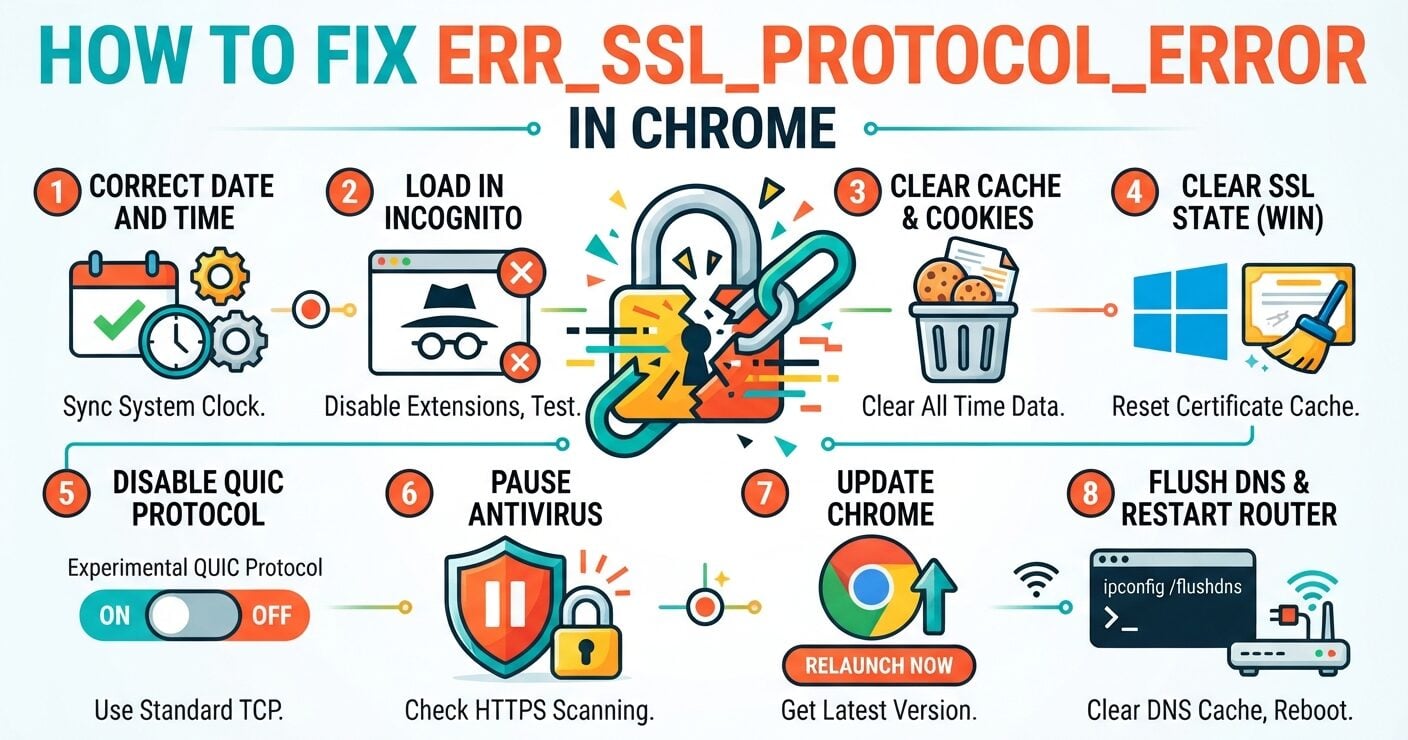
You click a link and Chrome stops cold. “This site can’t provide a secure connection,” it says, with ERR_SSL_PROTOCOL_ERROR underneath.
The fault sits in one of two places: your device or the website’s server. A wrong clock, stale cache or strict antivirus covers most cases on your side. Expired certificates and old TLS settings cover the rest.
What ERR_SSL_PROTOCOL_ERROR Means in Chrome
Chrome shows this code when the SSL/TLS handshake fails. The handshake is a short exchange where the browser checks the certificate and both sides agree on encryption.
If one detail fails, Chrome drops the connection. That is by design. Loading the page anyway would send your data as readable text.
The label says SSL, but modern sites run on TLS. Chrome kept the old name.
Why Does ERR_SSL_PROTOCOL_ERROR Appear on Only One Site?
Answer this first, because it tells you where to look. One failing site points to that site’s server. Every HTTPS site failing points to your own machine or network.
Server triggers include an expired certificate, a certificate issued for another domain, a missing intermediate file, or a server stuck on old TLS versions.
Local triggers are a clock set to the wrong date, cached certificate data that no longer matches, antivirus that scans HTTPS traffic, and an outdated browser. Google’s QUIC protocol can also clash with some firewalls.
A quick test helps. Open the page on your phone over mobile data. If it loads there, the problem lives on your computer or home network.
How to Fix ERR_SSL_PROTOCOL_ERROR in Chrome, Step by Step
Work through these in order. Most readers never get past step three.
1. Correct the Date and Time
Every certificate carries a start date and an end date. If your clock falls outside that window, Chrome treats a valid certificate as broken.
On Windows, open Settings, then Time & language, and turn on “Set time automatically.” On a Mac, go to System Settings, General, then Date & Time. A drifting clock also produces the NET::ERR_CERT_DATE_INVALID warning, so fix it before anything else.
2. Load the Page in Incognito
Press Ctrl + Shift + N and try the site again. Incognito runs without extensions and ignores stored cookies.
If the page opens, go to chrome://extensions and switch add-ons off one at a time. VPN and ad-block extensions are frequent suspects. Proxy-based tools can also trigger err_tunnel_connection_failed in Chrome.
3. Clear Cached Files and Cookies
Press Ctrl + Shift + Delete, set the range to “All time,” and tick cached images and files plus cookies. You will be signed out of most sites.
Stale cache sits behind several Chrome faults, including the Confirm Form Resubmission prompt.
4. Clear the SSL State on Windows
Windows keeps its own store of certificate sessions. Search the Start menu for “Internet Options,” open the Content tab, and press Clear SSL state. Restart Chrome afterward.
5. Turn Off QUIC in chrome://flags
Type chrome://flags/#enable-quic into the address bar. Set Experimental QUIC protocol to Disabled, then click Relaunch.
QUIC runs over UDP, and some firewalls handle it poorly. Switching it off sends Chrome back to standard TCP connections.
6. Pause Antivirus HTTPS Scanning
Google’s Chrome help pages list antivirus with “HTTPS scanning” as a known cause of connection errors. These tools slip their own certificate into the chain.
Turn that feature off, reload the page, then switch protection back on. If the page loaded, add the site to the allow list instead of leaving scanning disabled.
7. Update Chrome and the Operating System
Open the three-dot menu, then Help, then About Google Chrome. Chrome checks for a new build and shows a Relaunch button when one is ready.
Old builds cause other trouble too, such as pages that stall with the result_code_hung error.
8. Flush DNS and Restart the Router
Visit chrome://net-internals/#dns and click Clear host cache. On Windows, also run ipconfig /flushdns in Command Prompt. Then unplug the router for 30 seconds.
Network faults show up under other codes as well, like err_timed_out on a Chromebook or net::err_empty_response.
ERR_SSL_PROTOCOL_ERROR on a Chromebook
ChromeOS has no Internet Options panel, so step four does not apply. The rest carries over with small changes.
Open Settings, find Date and time, and let the time zone set itself. Then go to Settings, About ChromeOS, and check for updates. Chrome updates together with the system on a Chromebook.
If the error shows up alongside tab crashes, suspect an extension. The same disable-and-test routine clears STATUS_ACCESS_VIOLATION crashes.
Server Fixes When Visitors Report ERR_SSL_PROTOCOL_ERROR
Site owners should start with the certificate. Run the domain through an online SSL checker. Confirm the expiry date, the issuer, and that the domain appears in the Subject Alternative Names list.
Install the Full Certificate Chain
A renewal that uploads only the site certificate, without the intermediate file, breaks the chain. GreenGeeks reported an online store that went dark after a CDN switch for this reason. Uploading the complete chain fixed it.
Support TLS 1.2 and TLS 1.3
Chrome no longer accepts TLS 1.0 or 1.1. A server limited to those versions fails the handshake for every Chrome visitor. The fix belongs in the server configuration, not in user settings.
Check Port 443 and Redirect Rules
A server answering plain HTTP on port 443 produces this exact error. So do redirect rules that conflict between a CDN and the origin. Server error logs record each failed handshake with a timestamp.
A different case: Chrome connects but refuses a file. That points to response headers, covered in this guide to CORS and Content-Security-Policy blocks.
Is It Safe to Bypass ERR_SSL_PROTOCOL_ERROR?
No. This error seldom offers a “Proceed” link, because no secure connection exists to proceed with.
Skip guides that tell you to lower Windows security levels or re-enable outdated protocols. Those changes weaken every connection on the machine. If one site stays broken, contact its owner.
FAQs
What causes ERR_SSL_PROTOCOL_ERROR in Chrome?
A failed SSL/TLS handshake. Common triggers are a wrong system clock, stale cache, antivirus HTTPS scanning, QUIC conflicts, an expired or mismatched certificate, and servers that support only old TLS versions.
Can antivirus software cause ERR_SSL_PROTOCOL_ERROR?
Yes. Antivirus with HTTPS scanning intercepts encrypted traffic and can break the handshake. Turn scanning off to test, then add the site to the allow list and switch protection back on.
Does clearing Chrome’s cache delete saved passwords?
No. Clearing cached files and cookies signs you out of websites. Saved passwords stay unless you also tick “Passwords and other sign-in data” in the Advanced tab.
Why does Reddit show ERR_SSL_PROTOCOL_ERROR in Chrome?
Reddit keeps its certificates current, so the fault is almost always local. Check your clock, test in Incognito, and pause antivirus HTTPS scanning. School or office networks that filter Reddit can also break the handshake.
Should I follow Reddit advice to re-enable old TLS versions?
No. Chrome dropped TLS 1.0 and 1.1 because both are weak. Re-enabling outdated protocols exposes your traffic. The site owner needs to move the server to TLS 1.2 or later.
